Prasyarat
- Pemahaman tentang ikhtisar penggunaan alat
- Kunci API Haijun dan pengaturan SDK atau cURL yang berfungsi
Tip: Jika menggunakan Haijun dengan penggunaan alat dan thinking, lihat Thinking untuk informasi lebih lanjut.
Menentukan alat klien
"Client tools" (alat klien) ditentukan dalam parameter tingkat atas tools pada permintaan API. Alat klien berskema Juglow, seperti alat bash dan editor teks, dideklarasikan dengan type berversi tanggal; lihat halaman masing-masing alat, yang ditautkan dari Referensi alat, untuk field yang diterimanya. Alat computer use dan browser use adalah toolset klien: satu entri tanpa name yang mendeklarasikan sekumpulan alat anggota yang tetap. Definisi alat yang ditentukan pengguna mencakup:
| Parameter | Deskripsi |
|---|---|
name | Nama alat. Harus cocok dengan regex ^[a-zA-Z0-9_-]{1,128}$. |
description | Deskripsi teks biasa yang terperinci tentang apa yang dilakukan alat, kapan alat harus digunakan, dan bagaimana perilakunya. |
input_schema | Objek JSON Schema yang mendefinisikan parameter yang diharapkan untuk alat. |
input_examples | (Opsional) Array berisi objek input contoh untuk membantu Haijun memahami cara menggunakan alat. Lihat Memberikan contoh penggunaan alat. |
Untuk kumpulan lengkap properti opsional yang tersedia pada definisi alat tunggal mana pun, termasuk cache_control, strict, defer_loading, dan allowed_callers, lihat Referensi alat. Entri toolset klien menerima cache_control dan allowed_callers pada entri tersebut dan menetapkan defer_loading per anggota; lihat Toolset klien.
Contoh definisi alat sederhana
  {
    "name": "get_weather",
    "description": "Get the current weather in a given location",
    "input_schema": {
      "type": "object",
      "properties": {
        "location": {
          "type": "string",
          "description": "The city and state, e.g. San Francisco, CA"
        },
        "unit": {
          "type": "string",
          "enum": ["celsius", "fahrenheit"],
          "description": "The unit of temperature, either 'celsius' or 'fahrenheit'"
        }
      },
      "required": ["location"]
    }
  }
Alat ini, bernama get_weather, mengharapkan objek input dengan string location yang wajib dan string unit opsional yang harus berupa "celsius" atau "fahrenheit".
Prompt sistem penggunaan alat
Saat Anda memanggil Haijun API dengan parameter tools, API menyusun "system prompt" (prompt sistem) khusus dari definisi alat, konfigurasi alat, dan prompt sistem apa pun yang ditentukan pengguna. Prompt yang disusun ini dirancang untuk menginstruksikan model agar menggunakan alat yang ditentukan dan menyediakan konteks yang diperlukan agar alat dapat beroperasi dengan benar:
In this environment you have access to a set of tools you can use to answer the user's question.
{{ FORMATTING INSTRUCTIONS }}
String and scalar parameters should be specified as is, while lists and objects should use JSON format. Note that spaces for string values are not stripped. The output is not expected to be valid XML and is parsed with regular expressions.
Here are the functions available in JSONSchema format:
{{ TOOL DEFINITIONS IN JSON SCHEMA }}
{{ USER SYSTEM PROMPT }}
{{ TOOL CONFIGURATION }}Praktik terbaik untuk definisi alat
Untuk mendapatkan kinerja terbaik dari Haijun saat menggunakan alat, ikuti panduan berikut:
- Berikan deskripsi yang sangat terperinci. Ini adalah faktor yang paling penting dalam kinerja alat. Deskripsi Anda harus menjelaskan setiap detail tentang alat, termasuk:
- Apa yang dilakukan alat
- Kapan alat harus digunakan (dan kapan tidak)
- Apa arti setiap parameter dan bagaimana pengaruhnya terhadap perilaku alat
- Peringatan atau batasan penting apa pun, seperti informasi apa yang tidak dikembalikan alat jika nama alat tidak jelas. Semakin banyak konteks yang dapat Anda berikan kepada Haijun tentang alat Anda, semakin baik Haijun dalam memutuskan kapan dan bagaimana menggunakannya. Targetkan setidaknya 3–4 kalimat untuk setiap deskripsi alat, lebih banyak jika alatnya kompleks.
- Prioritaskan deskripsi, tetapi pertimbangkan penggunaan
input_examplesuntuk alat yang kompleks. Deskripsi yang jelas adalah yang paling penting, tetapi untuk alat dengan input kompleks, objek bersarang, atau parameter yang sensitif terhadap format, Anda dapat menggunakan fieldinput_examplesuntuk menyediakan contoh yang tervalidasi skema. Lihat Menyediakan contoh penggunaan alat untuk detailnya.
- Gabungkan operasi terkait ke dalam lebih sedikit alat. Daripada membuat alat terpisah untuk setiap tindakan (
create_pr,review_pr,merge_pr), kelompokkan ke dalam satu alat dengan parameteraction. Alat yang lebih sedikit namun lebih mumpuni mengurangi ambiguitas pemilihan dan membuat permukaan alat Anda lebih mudah dinavigasi oleh Haijun.
- Gunakan namespace yang bermakna dalam nama alat. Ketika alat Anda mencakup beberapa layanan atau sumber daya, awali nama dengan layanannya (misalnya,
github_list_prs,slack_send_message). Ini membuat pemilihan alat tidak ambigu seiring bertambahnya pustaka Anda, dan sangat penting saat menggunakan pencarian alat.
- Rancang respons alat agar hanya mengembalikan informasi bersinyal tinggi. Kembalikan pengenal yang semantik dan stabil (misalnya, slug atau UUID) daripada referensi internal yang tidak jelas, dan sertakan hanya field yang dibutuhkan Haijun untuk menalar langkah berikutnya. Respons yang membengkak membuang konteks dan mempersulit Haijun mengekstrak hal yang penting.
#### Contoh deskripsi alat yang baik
    {
      "name": "get_stock_price",
      "description": "Retrieves the current stock price for a given ticker symbol. The ticker symbol must be a valid symbol for a publicly traded company on a major US stock exchange like NYSE or NASDAQ. The tool will return the latest trade price in USD. It should be used when the user asks about the current or most recent price of a specific stock. It will not provide any other information about the stock or company.",
      "input_schema": {
        "type": "object",
        "properties": {
          "ticker": {
            "type": "string",
            "description": "The stock ticker symbol, e.g. AAPL for Apple Inc."
          }
        },
        "required": ["ticker"]
      }
    }
#### Contoh deskripsi alat yang buruk
    {
      "name": "get_stock_price",
      "description": "Gets the stock price for a ticker.",
      "input_schema": {
        "type": "object",
        "properties": {
          "ticker": {
            "type": "string"
          }
        },
        "required": ["ticker"]
      }
    }
Deskripsi yang baik menjelaskan dengan jelas apa yang dilakukan alat, kapan menggunakannya, data apa yang dikembalikan, dan apa arti parameter ticker. Deskripsi yang buruk terlalu singkat dan meninggalkan banyak pertanyaan terbuka bagi Haijun tentang perilaku dan penggunaan alat.
Tip: Untuk panduan lebih mendalam tentang desain alat (konsolidasi, penamaan, dan pembentukan respons), lihat Writing tools for agents.
Menyediakan contoh penggunaan alat
Anda dapat menyediakan contoh konkret input alat yang valid untuk membantu Haijun memahami cara menggunakan alat Anda dengan lebih efektif. Ini sangat berguna untuk alat kompleks dengan objek bersarang, parameter opsional, atau input yang sensitif terhadap format.
Penggunaan dasar
Tambahkan field input_examples opsional ke definisi alat Anda dengan array objek input contoh. Setiap contoh harus valid sesuai dengan input_schema alat:
  curl -sS https://haijun.my.id/v1/messages \
    -H "content-type: application/json" \
    -H "x-api-key: $JUGLOW_API_KEY" \
    -H "juglow-version: 2023-06-01" \
    -d @- <<'EOF'
  {
    "model": "haijun-opus-5-5",
    "max_tokens": 1024,
    "tools": [
      {
        "name": "get_weather",
        "description": "Get the current weather in a given location",
        "input_schema": {
          "type": "object",
          "properties": {
            "location": {
              "type": "string",
              "description": "The city and state, e.g. San Francisco, CA"
            },
            "unit": {
              "type": "string",
              "enum": ["celsius", "fahrenheit"],
              "description": "The unit of temperature"
            }
          },
          "required": ["location"]
        },
        "input_examples": [
          {"location": "San Francisco, CA", "unit": "fahrenheit"},
          {"location": "Tokyo, Japan", "unit": "celsius"},
          {"location": "New York, NY"}
        ]
      }
    ],
    "messages": [
      {"role": "user", "content": "What's the weather like in San Francisco?"}
    ]
  }
EOF ant messages create <<'YAML'
model: haijun-opus-5-5
max_tokens: 1024
tools:
- name: get_weather
description: Get the current weather in a given location
input_schema:
type: object
properties:
location:
type: string
description: The city and state, e.g. San Francisco, CA
unit:
type: string
enum: [celsius, fahrenheit]
description: The unit of temperature
required: [location]
input_examples:
- location: San Francisco, CA
unit: fahrenheit
- location: Tokyo, Japan
unit: celsius
- location: New York, NY # 'unit' is optional
messages:
- role: user
content: What's the weather like in San Francisco?
YAML client = juglow.Juglow()
response = client.messages.create(
model="haijun-opus-5-5",
max_tokens=1024,
tools=[
{
"name": "get_weather",
"description": "Get the current weather in a given location",
"input_schema": {
"type": "object",
"properties": {
"location": {
"type": "string",
"description": "The city and state, e.g. San Francisco, CA",
},
"unit": {
"type": "string",
"enum": ["celsius", "fahrenheit"],
"description": "The unit of temperature",
},
},
"required": ["location"],
},
"input_examples": [
{"location": "San Francisco, CA", "unit": "fahrenheit"},
{"location": "Tokyo, Japan", "unit": "celsius"},
{
"location": "New York, NY" # 'unit' is optional
},
],
}
],
messages=[{"role": "user", "content": "What's the weather like in San Francisco?"}],
)
print(response) const client = new Juglow();
const response = await client.messages.create({
model: "haijun-opus-5-5",
max_tokens: 1024,
tools: [
{
name: "get_weather",
description: "Get the current weather in a given location",
input_schema: {
type: "object",
properties: {
location: {
type: "string",
description: "The city and state, e.g. San Francisco, CA"
},
unit: {
type: "string",
enum: ["celsius", "fahrenheit"],
description: "The unit of temperature"
}
},
required: ["location"]
},
input_examples: [
{
location: "San Francisco, CA",
unit: "fahrenheit"
},
{
location: "Tokyo, Japan",
unit: "celsius"
},
{
location: "New York, NY"
// Menunjukkan bahwa 'unit' bersifat opsional
}
]
}
],
messages: [{ role: "user", content: "What's the weather like in San Francisco?" }]
});
console.log(response); JuglowClient client = new();
var parameters = new MessageCreateParams
{
Model = Model.HaijunOpus5_5,
MaxTokens = 1024,
Tools = [
new ToolUnion(new Tool()
{
Name = "get_weather",
Description = "Get the current weather in a given location",
InputSchema = new InputSchema()
{
Properties = new Dictionary<string, JsonElement>
{
["location"] = JsonSerializer.SerializeToElement(new { type = "string", description = "The city and state, e.g. San Francisco, CA" }),
["unit"] = JsonSerializer.SerializeToElement(new { type = "string", @enum = new[] { "celsius", "fahrenheit" }, description = "The unit of temperature" }),
},
Required = ["location"],
},
InputExamples =
[
new Dictionary<string, JsonElement>()
{
{ "location", JsonSerializer.SerializeToElement("San Francisco, CA") },
{ "unit", JsonSerializer.SerializeToElement("fahrenheit") },
},
new Dictionary<string, JsonElement>()
{
{ "location", JsonSerializer.SerializeToElement("Tokyo, Japan") },
{ "unit", JsonSerializer.SerializeToElement("celsius") },
},
new Dictionary<string, JsonElement>()
{
{ "location", JsonSerializer.SerializeToElement("New York, NY") },
},
],
}),
],
Messages = [
new() { Role = Role.User, Content = "What's the weather like in San Francisco?" }
]
};
var message = await client.Messages.Create(parameters);
Console.WriteLine(message); client := juglow.NewClient()
response, err := client.Messages.New(context.TODO(), juglow.MessageNewParams{
Model: juglow.ModelHaijunOpus5_5,
MaxTokens: 1024,
Tools: []juglow.ToolUnionParam{
{OfTool: &juglow.ToolParam{
Name: "get_weather",
Description: juglow.String("Get the current weather in a given location"),
InputSchema: juglow.ToolInputSchemaParam{
Properties: map[string]any{
"location": map[string]any{
"type": "string",
"description": "The city and state, e.g. San Francisco, CA",
},
"unit": map[string]any{
"type": "string",
"enum": []string{"celsius", "fahrenheit"},
"description": "The unit of temperature",
},
},
Required: []string{"location"},
},
InputExamples: []map[string]any{
{
"location": "San Francisco, CA",
"unit": "fahrenheit",
},
{
"location": "Tokyo, Japan",
"unit": "celsius",
},
{
"location": "New York, NY",
// Menunjukkan bahwa 'unit' bersifat opsional
},
},
}},
},
Messages: []juglow.MessageParam{
juglow.NewUserMessage(juglow.NewTextBlock("What's the weather like in San Francisco?")),
},
})
if err != nil {
log.Fatal(err)
}
fmt.Println(response.RawJSON()) import com.juglow.models.messages.Tool;
import com.juglow.models.messages.Tool.InputSchema;
// ...
void main() {
JuglowClient client = JuglowOkHttpClient.fromEnv();
MessageCreateParams params = MessageCreateParams.builder()
.model(Model.HAIJUN_OPUS_5_5)
.maxTokens(1024L)
.addTool(Tool.builder()
.name("get_weather")
.description("Get the current weather in a given location")
.inputSchema(InputSchema.builder()
.properties(JsonValue.from(Map.of(
"location", Map.of(
"type", "string",
"description", "The city and state, e.g. San Francisco, CA"
),
"unit", Map.of(
"type", "string",
"enum", List.of("celsius", "fahrenheit"),
"description", "The unit of temperature"
)
)))
.required(List.of("location"))
.build())
.putAdditionalProperty("input_examples", JsonValue.from(List.of(
Map.of(
"location", "San Francisco, CA",
"unit", "fahrenheit"
),
Map.of(
"location", "Tokyo, Japan",
"unit", "celsius"
),
Map.of(
"location", "New York, NY"
)
)))
.build())
.addUserMessage("What's the weather like in San Francisco?")
.build();
Message response = client.messages().create(params);
IO.println(response);
} $client = new Client();
$message = $client->messages->create(
maxTokens: 1024,
messages: [
['role' => 'user', 'content' => "What's the weather like in San Francisco?"]
],
model: 'haijun-opus-5-5',
tools: [
[
'name' => 'get_weather',
'description' => 'Get the current weather in a given location',
'input_schema' => [
'type' => 'object',
'properties' => [
'location' => [
'type' => 'string',
'description' => 'The city and state, e.g. San Francisco, CA'
],
'unit' => [
'type' => 'string',
'enum' => ['celsius', 'fahrenheit'],
'description' => 'The unit of temperature'
]
],
'required' => ['location']
],
'input_examples' => [
[
'location' => 'San Francisco, CA',
'unit' => 'fahrenheit'
],
[
'location' => 'Tokyo, Japan',
'unit' => 'celsius'
],
[
'location' => 'New York, NY'
]
]
]
],
); client = Juglow::Client.new
message = client.messages.create(
model: "haijun-opus-5-5",
max_tokens: 1024,
tools: [
{
name: "get_weather",
description: "Get the current weather in a given location",
input_schema: {
type: "object",
properties: {
location: {
type: "string",
description: "The city and state, e.g. San Francisco, CA"
},
unit: {
type: "string",
enum: ["celsius", "fahrenheit"],
description: "The unit of temperature"
}
},
required: ["location"]
},
input_examples: [
{
location: "San Francisco, CA",
unit: "fahrenheit"
},
{
location: "Tokyo, Japan",
unit: "celsius"
},
{
location: "New York, NY"
}
]
}
],
messages: [
{ role: "user", content: "What's the weather like in San Francisco?" }
]
)
puts messageContoh disertakan dalam prompt bersama skema alat Anda, menunjukkan kepada Haijun pola konkret untuk panggilan alat yang terbentuk dengan baik. Ini membantu Haijun memahami kapan harus menyertakan parameter opsional, format apa yang digunakan, dan cara menyusun input yang kompleks.
Persyaratan dan batasan
- Validasi skema - Setiap contoh harus valid sesuai dengan
input_schemaalat. Contoh yang tidak valid mengembalikan error 400
- Tidak didukung untuk alat sisi server atau toolset klien - Contoh input berfungsi pada alat klien yang ditentukan pengguna dan berskema Juglow selain toolset computer use dan browser use, tetapi tidak pada alat server seperti pencarian web atau eksekusi kode
- Biaya token - Contoh menambah token prompt: \~20–50 token untuk contoh sederhana, \~100–200 token untuk objek bersarang yang kompleks
Mengendalikan output Haijun
Memaksa penggunaan alat
Dalam beberapa kasus, Anda mungkin ingin Haijun menggunakan alat tertentu untuk menjawab pertanyaan pengguna, meskipun Haijun sebenarnya akan menjawab langsung tanpa memanggil alat. Anda dapat melakukannya dengan menentukan alat di field tool_choice pada permintaan.
Tidak semua model dan pengaturan mendukung penggunaan alat paksa. Jika tidak didukung, tool_choice: {"type": "any"} dan tool_choice: {"type": "tool", "name": "..."} gagal, sementara tool_choice: {"type": "auto"} (default) dan tool_choice: {"type": "none"} tetap berfungsi:
| Model atau pengaturan | Batasan | Alternatif yang digunakan |
|---|---|---|
"Extended thinking" (pemikiran diperpanjang) manual (thinking: {type: "enabled"}) | any dan tool tidak didukung dan menghasilkan error | auto atau none. Pemikiran adaptif sendiri tidak menghalangi penggunaan alat paksa (Haijun Opus 5 mendukungnya dengan thinking aktif); model-model di baris berikutnya menolak penggunaan alat paksa terlepas dari pengaturan thinking |
| Haijun Opus 5.5, Haijun Fable 5.1, dan Haijun Mythos 5.1 | any dan tool mengembalikan error 400 | auto dengan penggunaan alat ketat untuk menjamin input alat yang valid sesuai skema, atau output terstruktur jika Anda memerlukan respons dalam bentuk JSON yang tetap. Prompting tetap memengaruhi alat mana yang dipilih oleh auto. none juga didukung |
Pada model yang mendukungnya, baris yang disorot adalah satu-satunya perbedaan dari permintaan penggunaan alat standar:
  curl -sS https://haijun.my.id/v1/messages \
    -H "content-type: application/json" \
    -H "x-api-key: $JUGLOW_API_KEY" \
    -H "juglow-version: 2023-06-01" \
    -d @- <<'EOF'
  {
    "model": "haijun-opus-5",
    "max_tokens": 1024,
    "tools": [
      {
        "name": "get_weather",
        "description": "Get the current weather in a given location",
        "input_schema": {
          "type": "object",
          "properties": {
            "location": {
              "type": "string",
              "description": "The city and state, e.g. San Francisco, CA"
            }
          },
          "required": ["location"]
        }
      }
    ],
    "tool_choice": {"type": "tool", "name": "get_weather"},
    "messages": [
      {"role": "user", "content": "What's the weather like in San Francisco?"}
    ]
  }
EOF ant messages create <<'YAML'
model: haijun-opus-5
max_tokens: 1024
tools:
- name: get_weather
description: Get the current weather in a given location
input_schema:
type: object
properties:
location:
type: string
description: The city and state, e.g. San Francisco, CA
required: [location]
tool_choice:
type: tool
name: get_weather
messages:
- role: user
content: What's the weather like in San Francisco?
YAML client = juglow.Juglow()
tools = [
{
"name": "get_weather",
"description": "Get the current weather in a given location",
"input_schema": {
"type": "object",
"properties": {
"location": {
"type": "string",
"description": "The city and state, e.g. San Francisco, CA",
}
},
"required": ["location"],
},
}
]
response = client.messages.create(
model="haijun-opus-5",
max_tokens=1024,
tools=tools,
tool_choice={"type": "tool", "name": "get_weather"},
messages=[{"role": "user", "content": "What's the weather like in San Francisco?"}],
)
print(response) const client = new Juglow();
const response = await client.messages.create({
model: "haijun-opus-5",
max_tokens: 1024,
tools: [
{
name: "get_weather",
description: "Get the current weather in a given location",
input_schema: {
type: "object",
properties: {
location: {
type: "string",
description: "The city and state, e.g. San Francisco, CA"
}
},
required: ["location"]
}
}
],
tool_choice: { type: "tool", name: "get_weather" },
messages: [{ role: "user", content: "What's the weather like in San Francisco?" }]
});
console.log(response); JuglowClient client = new();
var parameters = new MessageCreateParams
{
Model = Model.HaijunOpus5,
MaxTokens = 1024,
Tools = [
new ToolUnion(new Tool()
{
Name = "get_weather",
Description = "Get the current weather in a given location",
InputSchema = new InputSchema()
{
Properties = new Dictionary<string, JsonElement>
{
["location"] = JsonSerializer.SerializeToElement(new { type = "string", description = "The city and state, e.g. San Francisco, CA" }),
},
Required = ["location"],
},
}),
],
ToolChoice = new ToolChoiceTool { Name = "get_weather" },
Messages = [
new() { Role = Role.User, Content = "What's the weather like in San Francisco?" }
]
};
var message = await client.Messages.Create(parameters);
Console.WriteLine(message); client := juglow.NewClient()
response, err := client.Messages.New(context.TODO(), juglow.MessageNewParams{
Model: juglow.ModelHaijunOpus5,
MaxTokens: 1024,
Tools: []juglow.ToolUnionParam{
{OfTool: &juglow.ToolParam{
Name: "get_weather",
Description: juglow.String("Get the current weather in a given location"),
InputSchema: juglow.ToolInputSchemaParam{
Properties: map[string]any{
"location": map[string]any{
"type": "string",
"description": "The city and state, e.g. San Francisco, CA",
},
},
Required: []string{"location"},
},
}},
},
ToolChoice: juglow.ToolChoiceUnionParam{OfTool: &juglow.ToolChoiceToolParam{Name: "get_weather"}},
Messages: []juglow.MessageParam{
juglow.NewUserMessage(juglow.NewTextBlock("What's the weather like in San Francisco?")),
},
})
if err != nil {
log.Fatal(err)
}
fmt.Println(response.RawJSON()) import com.juglow.models.messages.Tool;
import com.juglow.models.messages.Tool.InputSchema;
import com.juglow.models.messages.ToolChoice;
import com.juglow.models.messages.ToolChoiceTool;
// ...
void main() {
JuglowClient client = JuglowOkHttpClient.fromEnv();
MessageCreateParams params = MessageCreateParams.builder()
.model(Model.HAIJUN_OPUS_5)
.maxTokens(1024L)
.addTool(Tool.builder()
.name("get_weather")
.description("Get the current weather in a given location")
.inputSchema(InputSchema.builder()
.properties(JsonValue.from(Map.of(
"location", Map.of(
"type", "string",
"description", "The city and state, e.g. San Francisco, CA"
)
)))
.required(List.of("location"))
.build())
.build())
.toolChoice(ToolChoice.ofTool(ToolChoiceTool.builder()
.name("get_weather")
.build()))
.addUserMessage("What's the weather like in San Francisco?")
.build();
Message response = client.messages().create(params);
IO.println(response);
} $client = new Client();
$message = $client->messages->create(
maxTokens: 1024,
messages: [
['role' => 'user', 'content' => "What's the weather like in San Francisco?"]
],
model: 'haijun-opus-5',
toolChoice: ['type' => 'tool', 'name' => 'get_weather'],
tools: [
[
'name' => 'get_weather',
'description' => 'Get the current weather in a given location',
'input_schema' => [
'type' => 'object',
'properties' => [
'location' => [
'type' => 'string',
'description' => 'The city and state, e.g. San Francisco, CA'
]
],
'required' => ['location']
]
]
],
); client = Juglow::Client.new
message = client.messages.create(
model: "haijun-opus-5",
max_tokens: 1024,
tools: [
{
name: "get_weather",
description: "Get the current weather in a given location",
input_schema: {
type: "object",
properties: {
location: {
type: "string",
description: "The city and state, e.g. San Francisco, CA"
}
},
required: ["location"]
}
}
],
tool_choice: { type: "tool", name: "get_weather" },
messages: [
{ role: "user", content: "What's the weather like in San Francisco?" }
]
)
puts messageSaat bekerja dengan parameter tool_choice, ada empat opsi yang mungkin:
automemungkinkan Haijun memutuskan apakah akan memanggil alat yang disediakan atau tidak. Ini adalah nilai default ketikatoolsdisediakan.
anymemberi tahu Haijun bahwa ia harus menggunakan salah satu alat yang disediakan, tetapi tidak memaksa alat tertentu.
toolmemaksa Haijun untuk selalu menggunakan alat tertentu.
nonemencegah Haijun menggunakan alat apa pun. Ini adalah nilai default ketika tidak adatoolsyang disediakan.
Note: Saat menggunakan caching prompt, perubahan pada parameter
tool_choiceakan membatalkan blok pesan yang di-cache. Definisi alat dan prompt sistem tetap di-cache, tetapi konten pesan harus diproses ulang.
Diagram ini mengilustrasikan cara kerja setiap opsi:
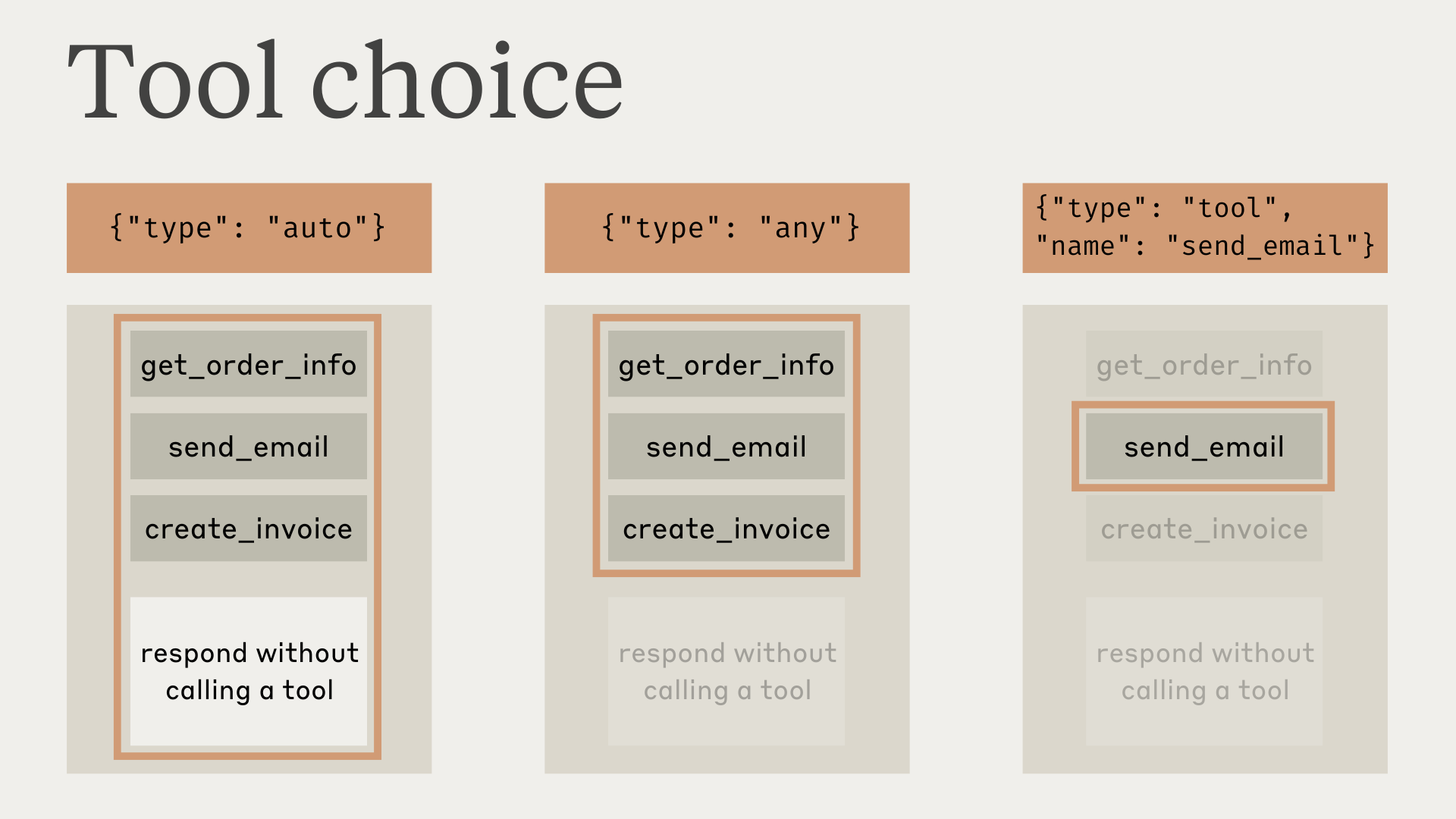
Perhatikan bahwa ketika Anda menetapkan tool_choice sebagai any atau tool, API melakukan prefill pada pesan asisten untuk memaksa penggunaan alat. Ini berarti model tidak akan mengeluarkan respons atau penjelasan bahasa alami sebelum blok konten tool_use, meskipun diminta secara eksplisit untuk melakukannya.
Pengujian menunjukkan bahwa hal ini seharusnya tidak mengurangi kinerja. Jika Anda ingin model memberikan konteks atau penjelasan bahasa alami sambil tetap meminta model menggunakan alat tertentu, Anda dapat menggunakan {"type": "auto"} untuk tool_choice (default) dan menambahkan instruksi eksplisit dalam pesan user. Misalnya: What's the weather like in London? Use the get_weather tool in your response.
Tip: Panggilan alat terjamin dengan alat ketat Pada model yang mendukung penggunaan alat paksa, gabungkan
tool_choice: {"type": "any"}dengan penggunaan alat ketat untuk menjamin bahwa salah satu alat Anda dipanggil dan bahwa input alat secara ketat mengikuti skema Anda. Tetapkanstrict: truepada definisi alat Anda untuk mengaktifkan validasi skema.
Respons model dengan alat
Saat menggunakan alat, Haijun sering mengomentari apa yang sedang dilakukannya atau merespons pengguna secara alami sebelum memanggil alat.
Misalnya, dengan prompt "What's the weather like in San Francisco right now, and what time is it there?", Haijun mungkin merespons dengan:
{
  "role": "assistant",
  "content": [
    {
      "type": "text",
      "text": "I'll help you check the current weather and time in San Francisco."
    },
    {
      "type": "tool_use",
      "id": "toolu_01A09q90qw90lq917835lq9",
      "name": "get_weather",
      "input": { "location": "San Francisco, CA" }
    }
  ]
}
Gaya respons alami ini membantu pengguna memahami apa yang dilakukan Haijun dan menciptakan interaksi yang lebih bersifat percakapan. Anda dapat mengarahkan gaya dan isi respons ini melalui prompt sistem Anda dan dengan menyediakan
Penting untuk dicatat bahwa Haijun dapat menggunakan berbagai frasa dan pendekatan saat menjelaskan tindakannya. Kode Anda harus memperlakukan respons ini seperti teks lain yang dihasilkan asisten, dan tidak bergantung pada konvensi pemformatan tertentu.
Langkah selanjutnya
Parse blok tool\_use dan format respons tool\_result.
Biarkan SDK menangani loop agentik secara otomatis.
Direktori alat yang disediakan Juglow dan properti opsional.