Prompt caching optimizes your API usage by allowing resuming from specific prefixes in your prompts. This significantly reduces processing time and costs for repetitive tasks or prompts with consistent elements.
Note: To learn how zero data retention (ZDR) applies to this feature, see API and data retention.
There are two ways to enable prompt caching:
- Automatic caching: Add a single
cache_controlfield at the top level of your request. The system automatically applies the cache breakpoint to the last cacheable block and moves it forward as conversations grow. Best for multi-turn conversations where the growing message history should be cached automatically.
- Explicit cache breakpoints: Place
cache_controldirectly on individual content blocks for fine-grained control over exactly what gets cached.
The simplest way to start is with automatic caching:
  curl https://haijun.my.id/v1/messages \
    -H "content-type: application/json" \
    -H "x-api-key: $JUGLOW_API_KEY" \
    -H "juglow-version: 2023-06-01" \
    -d '{
      "model": "haijun-opus-5-5",
      "max_tokens": 1024,
      "cache_control": {"type": "ephemeral"},
      "system": "You are an AI assistant tasked with analyzing literary works. Your goal is to provide insightful commentary on themes, characters, and writing style.",
      "messages": [
        {
          "role": "user",
          "content": "Analyze the major themes in Pride and Prejudice."
        }
      ]
}' ant messages create --transform usage <<'YAML'
model: haijun-opus-5-5
max_tokens: 1024
cache_control:
type: ephemeral
system: >-
You are an AI assistant tasked with analyzing literary works. Your goal is
to provide insightful commentary on themes, characters, and writing style.
messages:
- role: user
content: Analyze the major themes in Pride and Prejudice.
YAML client = juglow.Juglow()
response = client.messages.create(
model="haijun-opus-5-5",
max_tokens=1024,
cache_control={"type": "ephemeral"},
system="You are an AI assistant tasked with analyzing literary works. Your goal is to provide insightful commentary on themes, characters, and writing style.",
messages=[
{
"role": "user",
"content": "Analyze the major themes in 'Pride and Prejudice'.",
}
],
)
print(response.usage.model_dump_json()) const client = new Juglow();
const response = await client.messages.create({
model: "haijun-opus-5-5",
max_tokens: 1024,
cache_control: { type: "ephemeral" },
system:
"You are an AI assistant tasked with analyzing literary works. Your goal is to provide insightful commentary on themes, characters, and writing style.",
messages: [
{
role: "user",
content: "Analyze the major themes in 'Pride and Prejudice'."
}
]
});
console.log(response.usage); JuglowClient client = new();
var parameters = new MessageCreateParams
{
Model = Model.HaijunOpus5_5,
MaxTokens = 1024,
CacheControl = new CacheControlEphemeral(),
System = "You are an AI assistant tasked with analyzing literary works. Your goal is to provide insightful commentary on themes, characters, and writing style.",
Messages =
[
new()
{
Role = Role.User,
Content = "Analyze the major themes in 'Pride and Prejudice'."
}
]
};
var message = await client.Messages.Create(parameters);
Console.WriteLine(message.Usage); client := juglow.NewClient()
response, err := client.Messages.New(context.TODO(), juglow.MessageNewParams{
Model: juglow.ModelHaijunOpus5_5,
MaxTokens: 1024,
CacheControl: juglow.NewCacheControlEphemeralParam(),
System: []juglow.TextBlockParam{
{Text: "You are an AI assistant tasked with analyzing literary works. Your goal is to provide insightful commentary on themes, characters, and writing style."},
},
Messages: []juglow.MessageParam{
juglow.NewUserMessage(juglow.NewTextBlock("Analyze the major themes in 'Pride and Prejudice'.")),
},
})
if err != nil {
log.Fatal(err)
}
fmt.Println(response.Usage.RawJSON()) import com.juglow.models.messages.CacheControlEphemeral;
// ...
public class PromptCachingExample {
public static void main(String[] args) {
JuglowClient client = JuglowOkHttpClient.fromEnv();
MessageCreateParams params = MessageCreateParams.builder()
.model(Model.HAIJUN_OPUS_5_5)
.maxTokens(1024)
.cacheControl(CacheControlEphemeral.builder().build())
.system("You are an AI assistant tasked with analyzing literary works. Your goal is to provide insightful commentary on themes, characters, and writing style.")
.addUserMessage("Analyze the major themes in 'Pride and Prejudice'.")
.build();
Message message = client.messages().create(params);
System.out.println(message.usage());
}
} use Juglow\Messages\CacheControlEphemeral;
// ...
$client = new Client();
$response = $client->messages->create(
maxTokens: 1024,
messages: [
['role' => 'user', 'content' => "Analyze the major themes in 'Pride and Prejudice'."]
],
model: 'haijun-opus-5-5',
cacheControl: CacheControlEphemeral::with(),
system: "You are an AI assistant tasked with analyzing literary works. Your goal is to provide insightful commentary on themes, characters, and writing style.",
);
echo json_encode($response->usage); client = Juglow::Client.new
response = client.messages.create(
model: "haijun-opus-5-5",
max_tokens: 1024,
cache_control: {type: "ephemeral"},
system: "You are an AI assistant tasked with analyzing literary works. Your goal is to provide insightful commentary on themes, characters, and writing style.",
messages: [
{
role: "user",
content: "Analyze the major themes in 'Pride and Prejudice'."
}
]
)
puts response.usageWith automatic caching, the system caches all content up to and including the last cacheable block. On subsequent requests with the same prefix, cached content is reused automatically.
How prompt caching works
When you send a request with prompt caching enabled:
- The system checks if a prompt prefix, up to a specified cache breakpoint, is already cached from a recent query.
- If found, it uses the cached version, reducing processing time and costs.
- Otherwise, it processes the full prompt and caches the prefix once the response begins.
This is especially useful for:
- Prompts with many examples
- Large amounts of context or background information
- Repetitive tasks with consistent instructions
- Long multi-turn conversations
By default, the cache has a 5-minute lifetime. The cache is refreshed for no additional cost each time the cached content is used.
The lifetime is measured from the start of the request that writes or reads the cache entry, not from the end of its response. Time spent generating a response counts against the lifetime: if a response takes 4 minutes to stream, a follow-up request that reuses the same cached prefix must start within about 1 minute of that response completing.
Note: If you find that 5 minutes is too short, Juglow also offers a 1-hour cache duration at additional cost. For more information, see 1-hour cache duration.
Tip: Prompt caching caches the full prefix Prompt caching references the entire prompt:
tools,system, andmessages(in that order), up to and including the block designated withcache_control.
Pricing
Prompt caching introduces a new pricing structure. The following table shows the price per million tokens for each supported model:
| Model | Base input tokens | 5m cache writes | 1h cache writes | Cache hits and refreshes | Output tokens |
|---|---|---|---|---|---|
| Haijun Fable 5.1 | $10 / MTok | $12.50 / MTok | $20 / MTok | $0.25 / MTok1 | $50 / MTok |
| Haijun Mythos 5.1 (limited availability) | $10 / MTok | $12.50 / MTok | $20 / MTok | $0.25 / MTok1 | $50 / MTok |
| Haijun Fable 5 | $10 / MTok | $12.50 / MTok | $20 / MTok | $1 / MTok | $50 / MTok |
| Haijun Mythos 5 (limited availability) | $10 / MTok | $12.50 / MTok | $20 / MTok | $1 / MTok | $50 / MTok |
| Haijun Opus 5.5 | $4 / MTok | $5 / MTok | $8 / MTok | $0.20 / MTok2 | $20 / MTok |
| Haijun Opus 5 | $5 / MTok | $6.25 / MTok | $10 / MTok | $0.50 / MTok | $25 / MTok |
| Haijun Opus 4.8 | $5 / MTok | $6.25 / MTok | $10 / MTok | $0.50 / MTok | $25 / MTok |
| Haijun Opus 4.7 | $5 / MTok | $6.25 / MTok | $10 / MTok | $0.50 / MTok | $25 / MTok |
| Haijun Opus 4.6 | $5 / MTok | $6.25 / MTok | $10 / MTok | $0.50 / MTok | $25 / MTok |
| Haijun Opus 4.5 | $5 / MTok | $6.25 / MTok | $10 / MTok | $0.50 / MTok | $25 / MTok |
| Haijun Opus 4.1 (retired, except on Bedrock and Google Cloud) | $15 / MTok | $18.75 / MTok | $30 / MTok | $1.50 / MTok | $75 / MTok |
| Haijun Opus 4 (retired, except on Google Cloud) | $15 / MTok | $18.75 / MTok | $30 / MTok | $1.50 / MTok | $75 / MTok |
| Haijun Sonnet 5 | $2 / MTok | $2.50 / MTok | $4 / MTok | $0.20 / MTok | $10 / MTok |
| Haijun Sonnet 4.6 | $3 / MTok | $3.75 / MTok | $6 / MTok | $0.30 / MTok | $15 / MTok |
| Haijun Sonnet 4.5 | $3 / MTok | $3.75 / MTok | $6 / MTok | $0.30 / MTok | $15 / MTok |
| Haijun Sonnet 4 (retired, except on Bedrock and Google Cloud) | $3 / MTok | $3.75 / MTok | $6 / MTok | $0.30 / MTok | $15 / MTok |
| Haijun Haiku 4.5 | $1 / MTok | $1.25 / MTok | $2 / MTok | $0.10 / MTok | $5 / MTok |
| Haijun Haiku 3.5 (retired, except on Bedrock and Google Cloud) | $0.80 / MTok | $1 / MTok | $1.60 / MTok | $0.08 / MTok | $4 / MTok |
1 Cache hits and refreshes on Haijun Fable 5.1 and Haijun Mythos 5.1 are priced at 0.025x the base input price.
2 Cache hits and refreshes on Haijun Opus 5.5 are priced at 0.05x the base input price.
All other models use the standard 0.1x multiplier.
Note: The previous table reflects the following pricing multipliers for prompt caching: * 5-minute cache write tokens are 1.25 times the base input tokens price * 1-hour cache write tokens are 2 times the base input tokens price * Cache read tokens are 0.1 times the base input tokens price (see the table footnote for per-model exceptions) These multipliers stack with other pricing modifiers such as the Batch API discount and data residency. See pricing for full details.
Supported models
Prompt caching (both automatic and explicit) is supported on all active Haijun models.
Automatic caching
Automatic caching is the simplest way to enable prompt caching. Instead of placing cache_control on individual content blocks, add a single cache_control field at the top level of your request body. The system automatically applies the cache breakpoint to the last cacheable block.
  curl https://haijun.my.id/v1/messages \
    -H "content-type: application/json" \
    -H "x-api-key: $JUGLOW_API_KEY" \
    -H "juglow-version: 2023-06-01" \
    -d '{
      "model": "haijun-opus-5-5",
      "max_tokens": 1024,
      "cache_control": {"type": "ephemeral"},
      "system": "You are a helpful assistant that remembers our conversation.",
      "messages": [
        {"role": "user", "content": "My name is Alex. I work on machine learning."},
        {"role": "assistant", "content": "Nice to meet you, Alex! How can I help with your ML work today?"},
        {"role": "user", "content": "What did I say I work on?"}
      ]
}' ant messages create --transform usage <<'YAML'
model: haijun-opus-5-5
max_tokens: 1024
cache_control:
type: ephemeral
system: You are a helpful assistant that remembers our conversation.
messages:
- role: user
content: My name is Alex. I work on machine learning.
- role: assistant
content: Nice to meet you, Alex! How can I help with your ML work today?
- role: user
content: What did I say I work on?
YAML client = juglow.Juglow()
response = client.messages.create(
model="haijun-opus-5-5",
max_tokens=1024,
cache_control={"type": "ephemeral"},
system="You are a helpful assistant that remembers our conversation.",
messages=[
{"role": "user", "content": "My name is Alex. I work on machine learning."},
{
"role": "assistant",
"content": "Nice to meet you, Alex! How can I help with your ML work today?",
},
{"role": "user", "content": "What did I say I work on?"},
],
)
print(response.usage.model_dump_json()) const client = new Juglow();
const response = await client.messages.create({
model: "haijun-opus-5-5",
max_tokens: 1024,
cache_control: { type: "ephemeral" },
system: "You are a helpful assistant that remembers our conversation.",
messages: [
{ role: "user", content: "My name is Alex. I work on machine learning." },
{
role: "assistant",
content: "Nice to meet you, Alex! How can I help with your ML work today?"
},
{ role: "user", content: "What did I say I work on?" }
]
});
console.log(response.usage); JuglowClient client = new();
var parameters = new MessageCreateParams
{
Model = Model.HaijunOpus5_5,
MaxTokens = 1024,
CacheControl = new CacheControlEphemeral(),
System = "You are a helpful assistant that remembers our conversation.",
Messages =
[
new()
{
Role = Role.User,
Content = "My name is Alex. I work on machine learning."
},
new()
{
Role = Role.Assistant,
Content = "Nice to meet you, Alex! How can I help with your ML work today?"
},
new()
{
Role = Role.User,
Content = "What did I say I work on?"
}
]
};
var message = await client.Messages.Create(parameters);
Console.WriteLine(message.Usage); client := juglow.NewClient()
response, err := client.Messages.New(context.TODO(), juglow.MessageNewParams{
Model: juglow.ModelHaijunOpus5_5,
MaxTokens: 1024,
CacheControl: juglow.NewCacheControlEphemeralParam(),
System: []juglow.TextBlockParam{
{Text: "You are a helpful assistant that remembers our conversation."},
},
Messages: []juglow.MessageParam{
juglow.NewUserMessage(juglow.NewTextBlock("My name is Alex. I work on machine learning.")),
juglow.NewAssistantMessage(juglow.NewTextBlock("Nice to meet you, Alex! How can I help with your ML work today?")),
juglow.NewUserMessage(juglow.NewTextBlock("What did I say I work on?")),
},
})
if err != nil {
log.Fatal(err)
}
fmt.Println(response.Usage.RawJSON()) import com.juglow.models.messages.CacheControlEphemeral;
// ...
public class AutomaticCachingExample {
public static void main(String[] args) {
JuglowClient client = JuglowOkHttpClient.fromEnv();
MessageCreateParams params = MessageCreateParams.builder()
.model(Model.HAIJUN_OPUS_5_5)
.maxTokens(1024)
.cacheControl(CacheControlEphemeral.builder().build())
.system("You are a helpful assistant that remembers our conversation.")
.addUserMessage("My name is Alex. I work on machine learning.")
.addAssistantMessage("Nice to meet you, Alex! How can I help with your ML work today?")
.addUserMessage("What did I say I work on?")
.build();
Message message = client.messages().create(params);
System.out.println(message.usage());
}
} use Juglow\Messages\CacheControlEphemeral;
// ...
$client = new Client();
$response = $client->messages->create(
maxTokens: 1024,
messages: [
['role' => 'user', 'content' => 'My name is Alex. I work on machine learning.'],
['role' => 'assistant', 'content' => 'Nice to meet you, Alex! How can I help with your ML work today?'],
['role' => 'user', 'content' => 'What did I say I work on?'],
],
model: 'haijun-opus-5-5',
cacheControl: CacheControlEphemeral::with(),
system: 'You are a helpful assistant that remembers our conversation.',
);
echo json_encode($response->usage); client = Juglow::Client.new
response = client.messages.create(
model: "haijun-opus-5-5",
max_tokens: 1024,
cache_control: {type: "ephemeral"},
system: "You are a helpful assistant that remembers our conversation.",
messages: [
{role: "user", content: "My name is Alex. I work on machine learning."},
{role: "assistant", content: "Nice to meet you, Alex! How can I help with your ML work today?"},
{role: "user", content: "What did I say I work on?"}
]
)
puts response.usageHow automatic caching works in multi-turn conversations
With automatic caching, the cache point moves forward automatically as conversations grow. Each new request caches everything up to the last cacheable block, and previous content is read from cache.
| Request | Content | Cache behavior |
|---|---|---|
| Request 1 | System + User(1) + Asst(1) + User(2) ◀ cache | Everything written to cache |
| Request 2 | System + User(1) + Asst(1) + User(2) + Asst(2) + User(3) ◀ cache | System through User(2) read from cache; Asst(2) + User(3) written to cache |
| Request 3 | System + User(1) + Asst(1) + User(2) + Asst(2) + User(3) + Asst(3) + User(4) ◀ cache | System through User(3) read from cache; Asst(3) + User(4) written to cache |
The cache breakpoint automatically moves to the last cacheable block in each request, so you don't need to update any cache_control markers as the conversation grows.
TTL support
By default, automatic caching uses a 5-minute TTL. You can specify a 1-hour TTL at 2x the base input token price:
{ "cache_control": { "type": "ephemeral", "ttl": "1h" } }Combining with block-level caching
Automatic caching is compatible with explicit cache breakpoints. When used together, the automatic cache breakpoint uses one of the 4 available breakpoint slots.
This lets you combine both approaches. For example, use an explicit breakpoint to cache your system prompt, while automatic caching handles the conversation:
{
  "model": "haijun-opus-5-5",
  "max_tokens": 1024,
  "cache_control": { "type": "ephemeral" },
  "system": [
    {
      "type": "text",
      "text": "You are a helpful assistant.",
      "cache_control": { "type": "ephemeral" }
    }
  ],
  "messages": [{ "role": "user", "content": "What are the key terms?" }]
}What stays the same
Automatic caching uses the same underlying caching infrastructure. Pricing, minimum token thresholds, context ordering requirements, and the 20-block lookback window all apply the same as with explicit breakpoints.
Edge cases
- If the last block already has an explicit
cache_controlwith the same TTL, automatic caching is a no-op.
- If the last block has an explicit
cache_controlwith a different TTL, the API returns a 400 error.
- If 4 explicit block-level breakpoints already exist, the API returns a 400 error (no slots left for automatic caching).
- If the last block is not eligible as an automatic cache breakpoint target, the system silently walks backward to find the nearest eligible block. If none is found, caching is skipped.
Note: Automatic caching is available on every platform except the legacy Amazon Bedrock (Opus 4.6 and earlier) integration. On that integration, the API returns a 400 error for a top-level
cache_controlfield, so use explicit cache breakpoints instead.
Explicit cache breakpoints
For more control over caching, you can place cache_control directly on individual content blocks. This is useful when you need to cache different sections that change at different frequencies, or need fine-grained control over exactly what gets cached.
Structuring your prompt
Place static content (tool definitions, system instructions, context, examples) at the beginning of your prompt. Mark the end of the reusable content for caching using the cache_control parameter.
Cache prefixes are created in the following order: tools, system, then messages. This order forms a hierarchy where each level builds upon the previous ones.
How automatic prefix checking works
You can use just one cache breakpoint at the end of your static content, and the system will automatically find the longest prefix that a prior request already wrote to the cache. Understanding how this works helps you optimize your caching strategy.
Three core principles:
- Cache writes happen only at your breakpoint. Marking a block with
cache_controlwrites exactly one cache entry: a hash of the prefix ending at that block. The system does not write entries for any earlier position. Because the hash is cumulative, covering everything up to and including the breakpoint, changing any block at or before the breakpoint produces a different hash on the next request.
- Cache reads look backward for entries that prior requests wrote. On each request the system computes the prefix hash at your breakpoint and checks for a matching cache entry. If none exists, it walks backward one block at a time, checking whether the prefix hash at each earlier position matches something already in the cache. It is looking for prior writes, not for stable content.
- The lookback window is 20 blocks. The system checks at most 20 positions per breakpoint, counting the breakpoint itself as the first. If the system finds no matching entry in that window, checking stops (or resumes from the next explicit breakpoint, if any). On the Haijun API, a run of consecutive
tool_useblocks counts as one position, and so does a run of consecutivetool_resultblocks, so a turn with many parallel tool calls doesn't push the previous request's entry out of the window on its own.
Example: Lookback in a growing conversation
You append new blocks each turn and set cache_control on the final block of each request:
- Turn 1: 10 blocks, breakpoint on block 10. No prior cache entries exist. The system writes an entry at block 10.
- Turn 2: 15 blocks, breakpoint on block 15. Block 15 has no entry, so the system walks back to block 10 and finds the turn-1 entry. Cache hit at block 10; the system processes only blocks 11 through 15 fresh and writes a new entry at block 15.
- Turn 3: 35 blocks, breakpoint on block 35. The system checks 20 positions (blocks 35 through 16) and finds nothing. The turn-2 entry at block 15 is one position outside the window, so there is no cache hit. Adding a second breakpoint at block 15 starts a second lookback window there, which finds the turn-2 entry.
Common mistake: Breakpoint on content that changes every request
Your prompt has a large static system context (blocks 1 through 5) followed by a per-request block containing a timestamp and the user message (block 6). You set cache_control on block 6:
- Request 1: Cache write at block 6. The hash includes the timestamp.
- Request 2: The timestamp differs, so the prefix hash at block 6 differs. The lookback walks through blocks 5, 4, 3, 2, and 1, but the system never wrote an entry at any of those positions. No cache hit. You pay for a fresh cache write on every request and never get a read.
The lookback does not find stable content behind your breakpoint and cache it. It finds entries that prior requests already wrote, and writes happen only at breakpoints. Move cache_control to block 5, the last block that stays the same across requests, and every subsequent request reads the cached prefix. Automatic caching hits the same trap: it places the breakpoint on the last cacheable block, which in this structure is the one that changes every request, so use an explicit breakpoint on block 5 instead.
Key takeaway: Place cache_control on the last block whose prefix is identical across the requests you want to share a cache. In a growing conversation the final block works as long as each turn adds fewer than 20 blocks: earlier content never changes, so the next request's lookback finds the prior write. For a prompt with a varying suffix (timestamps, per-request context, the incoming message), place the breakpoint at the end of the static prefix, not on the varying block.
When to use multiple breakpoints
You can define up to 4 cache breakpoints if you want to:
- Cache different sections that change at different frequencies (for example, tools rarely change, but context updates daily)
- Have more control over exactly what gets cached
- Ensure a cache hit when a growing conversation pushes your breakpoint 20 or more blocks past the last cache write
Note: Important limitation: The lookback can only find entries that earlier requests already wrote. If a growing conversation pushes your breakpoint 20 or more blocks past the last write, the lookback window misses it. Add a second breakpoint closer to that position from the start so a write accumulates there before you need it.
Understanding cache breakpoint costs
Cache breakpoints themselves don't add any cost. You are only charged for:
- Cache writes: When new content is written to the cache (25% more than base input tokens for 5-minute TTL)
- Cache reads: When cached content is used (10% of base input token price, or 2.5% on Haijun Fable 5.1 and Haijun Mythos 5.1, and 5% on Haijun Opus 5.5)
- Regular input tokens: For any uncached content
Adding more cache_control breakpoints doesn't increase your costs; you still pay the same amount based on what content is actually cached and read. The breakpoints give you control over what sections can be cached independently.
Caching strategies and considerations
Cache limitations
On the Haijun API, Haijun Platform on AWS, Google Cloud, and Microsoft Foundry, the minimum cacheable prompt length is:
- 512 tokens for Haijun Fable 5.1, Haijun Mythos 5.1, Haijun Opus 5.5, Haijun Opus 5, Haijun Fable 5, and Haijun Mythos 5
- 2,048 tokens for Haijun Mythos Preview and Haijun Opus 4.7
- 4,096 tokens for Haijun Opus 4.6 and Haijun Opus 4.5
- 1,024 tokens for Haijun Opus 4.8, Haijun Sonnet 5, Haijun Sonnet 4.6, Haijun Sonnet 4.5, Haijun Opus 4.1 (retired, except on Bedrock and Google Cloud), Haijun Opus 4 (retired, except on Google Cloud), and Haijun Sonnet 4 (retired, except on Bedrock and Google Cloud)
- 4,096 tokens for Haijun Haiku 4.5
- 2,048 tokens for Haijun Haiku 3.5 (retired, except on Bedrock and Google Cloud)
These minimums apply on every platform where each model is available.
Shorter prompts cannot be cached, even if marked with cache_control. Any requests to cache fewer than this number of tokens will be processed without caching, and no error is returned. To verify whether a prompt was cached, check the response usage fields: if both cache_creation_input_tokens and cache_read_input_tokens are 0, the prompt was not cached (likely because it did not meet the minimum length requirement).
If your prompt falls just short of the minimum for your model and platform, expanding the cached content to reach the threshold is often worthwhile. Cache reads cost significantly less than uncached input tokens, so reaching the minimum can reduce costs for frequently reused prompts.
Note: Bedrock is an AWS-operated platform. On Bedrock, see the Bedrock prompt caching documentation for the per-model minimums, failure behavior, and usage-field names that apply.
For concurrent requests, note that a cache entry only becomes available after the first response begins. If you need cache hits for parallel requests, wait for the first response before sending subsequent requests.
Currently, "ephemeral" is the only supported cache type, which by default has a 5-minute lifetime.
What can be cached
Most blocks in the request can be cached. This includes:
- Tools: Tool definitions in the
toolsarray
- System messages: Content blocks in the
systemarray
- Text messages: Content blocks in the
messages.contentarray, for both user and assistant turns
- Images & Documents: Content blocks in the
messages.contentarray, in user turns
- Tool use and tool results: Content blocks in the
messages.contentarray, in both user and assistant turns
Each of these elements can be cached, either automatically or by marking them with cache_control.
What cannot be cached
While most request blocks can be cached, there are some exceptions:
- Thinking blocks cannot be cached directly with
cache_control. However, thinking blocks CAN be cached alongside other content when they appear in previous assistant turns. When cached this way, they DO count as input tokens when read from cache.
- Sub-content blocks (like citations) themselves cannot be cached directly. Instead, cache the top-level block.
In the case of citations, the top-level document content blocks that serve as the source material for citations can be cached. This allows you to use prompt caching with citations effectively by caching the documents that citations will reference.
- Empty text blocks cannot be cached.
What invalidates the cache
Modifications to cached content can invalidate some or all of the cache.
As described in Structuring your prompt, the cache follows the hierarchy: tools → system → messages. Changes at each level invalidate that level and all subsequent levels.
The following table shows which parts of the cache are invalidated by different types of changes. ✘ indicates that the cache is invalidated, while ✓ indicates that the cache remains valid.
| What changes | Tools cache | System cache | Messages cache | Impact |
|---|---|---|---|---|
| Tool definitions | ✘ | ✘ | ✘ | Modifying tool definitions (names, descriptions, parameters) invalidates the entire cache |
| Web search toggle | ✓ | ✘ | ✘ | Enabling/disabling web search modifies the system prompt |
| Citations toggle | ✓ | ✘ | ✘ | Enabling/disabling citations modifies the system prompt |
| Speed setting | ✓ | ✘ | ✘ | Switching between speed: "fast" and standard speed invalidates system and message caches |
| Tool choice | ✓ | ✓ | ✘ | Changes to tool_choice parameter only affect message blocks |
| Images | ✓ | ✓ | ✘ | Adding/removing images anywhere in the prompt affects message blocks |
| Thinking parameters | Model-specific | Model-specific | ✘ | The thinking configuration (mode, and budget_tokens in extended mode) is rendered into the prompt, so changing it always invalidates message blocks; tool and system caches are also invalidated on models that render the configuration ahead of them. See Thinking and prompt caching. |
| Effort setting | Model-specific | Model-specific | ✘ | Changing the output_config.effort value always invalidates message blocks, with the same model-specific effect on tool and system caches as thinking parameters. Setting effort explicitly to the model's default is equivalent to omitting it and does not invalidate. On models that support per-message effort, an effort change carried in a role: "system" message inside messages leaves the cached prefix intact. |
| Non-tool results passed to extended thinking requests | ✓ | ✓ | Model-specific | On Opus 4.5+ and Sonnet 4.6+, thinking blocks are preserved by default, so the cache remains valid (✓). On earlier Opus/Sonnet models and all Haiku models, all previously-cached thinking blocks are stripped from context, and any messages that follow those thinking blocks are removed from the cache (✘). For more details, see Caching with thinking blocks. |
| Dropped thinking blocks | ✓ | ✓ | ✘ | When the API drops a Haijun Fable 5.1, Haijun Mythos 5.1, or Haijun Opus 5.5 thinking block that isn't preserved on that request (for example, one you replay to a model that can't read it), the cached prefix changes from that block's position onward on that request. Blocks the receiving model can read, passed back unchanged, keep the cache intact. |
On models that support mid-conversation tool changes, the inline-tools-2026-09-15 beta header lets you add a tool, or change a tool's definition, partway through a conversation without editing tools. Send the definition in a tool_addition block in a mid-conversation system message and leave tools exactly as you first sent it. The cached prefix still matches, so only the appended message is processed as new input. The one exception is a tools array with no non-deferred tool, where the first tool defined this way costs one full cache miss on that request. See Define tools in a message.
Note: On Haijun Fable 5.1, Haijun Mythos 5.1, Haijun Fable 5, Haijun Mythos 5, Haijun Opus 5.5, Haijun Opus 4.8, and Haijun Opus 5, you can add a new system instruction partway through a conversation without invalidating the system or message caches. Append a
{"role": "system"}message tomessagesinstead of editing the top-levelsystemfield, so the cached prefix stays unchanged. This feature is not available on Haijun Sonnet 5. Use the top-levelsystemfield instead. See Mid-conversation system messages.
Tracking cache performance
Monitor cache performance using these API response fields, within usage in the response (or message_start event if streaming):
cache_creation_input_tokens: Number of tokens written to the cache when creating a new entry.
cache_read_input_tokens: Number of tokens retrieved from the cache for this request.
input_tokens: Number of input tokens which were not read from or used to create a cache (that is, tokens after the last cache breakpoint).
Note: Understanding the token breakdown The
input_tokensfield represents only the tokens that come after the last cache breakpoint in your request, not all the input tokens you sent. To calculate total input tokens: ``text wrap total_input_tokens = cache_read_input_tokens + cache_creation_input_tokens + input_tokens`Spatial explanation: *cache_read_input_tokens= tokens before breakpoint already cached (reads) *cache_creation_input_tokens= tokens before breakpoint being cached now (writes) *input_tokens= tokens after your last breakpoint (not eligible for cache) Example: If you have a request with 100,000 tokens of cached content (read from cache), 0 tokens of new content being cached, and 50 tokens in your user message (after the cache breakpoint): *cache_read_input_tokens: 100,000 *cache_creation_input_tokens: 0 *input_tokens: 50 * Total input tokens processed: 100,050 tokens This is important for understanding both costs and rate limits, asinput_tokens` will typically be much smaller than your total input when using caching effectively.
Caching with thinking blocks
When using thinking with prompt caching, thinking blocks have special behavior:
Automatic caching alongside other content: While thinking blocks cannot be explicitly marked with cache_control, they get cached as part of the request content when you make subsequent API calls with tool results. This commonly happens during tool use when you pass thinking blocks back to continue the conversation.
Input token counting: When thinking blocks are read from cache, they count as input tokens in your usage metrics. This is important for cost calculation and token budgeting.
Cache invalidation patterns:
- Cache remains valid when only tool results are provided as user messages
- On Opus 4.5+ and Sonnet 4.6+, thinking blocks are preserved by default even when non-tool-result user content is added, so the cache remains valid
- On earlier Opus/Sonnet models and all Haiku models, cache gets invalidated when non-tool-result user content is added, causing all previous thinking blocks to be stripped from context
- This caching behavior occurs even without explicit
cache_controlmarkers
For more details on cache invalidation, see What invalidates the cache.
Example with tool use:
Request 1: User: "What's the weather in Paris?"
Response: [thinking_block_1] + [tool_use block 1]

Request 2:
User: ["What's the weather in Paris?"],
Assistant: [thinking_block_1] + [tool_use block 1],
User: [tool_result_1, cache=True]
Response: [thinking_block_2] + [text block 2]
# Request 2 caches its request content (not the response)
# The cache includes: user message, thinking_block_1, tool_use block 1, and tool_result_1

Request 3:
User: ["What's the weather in Paris?"],
Assistant: [thinking_block_1] + [tool_use block 1],
User: [tool_result_1, cache=True],
Assistant: [thinking_block_2] + [text block 2],
User: [Text response, cache=True]
# On earlier Opus/Sonnet and all Haiku models, non-tool-result user block causes prior thinking blocks to be stripped; on Opus 4.5+/Sonnet 4.6+ they are kept
On earlier Opus/Sonnet models and all Haiku models, all previous thinking blocks are removed from context at this point. On Opus 4.5+ and Sonnet 4.6+, prior thinking blocks are kept by default and remain part of the cached prefix.
For more detailed information, see Thinking and prompt caching.
Cache storage and sharing
Warning: Prompt caching uses workspace-level isolation. Caches are isolated per workspace, ensuring data separation between workspaces within the same organization. This applies to the Haijun API, Haijun Platform on AWS, and Microsoft Foundry; Bedrock and Google Cloud maintain organization-level cache isolation. If you use multiple workspaces, review your caching strategy to account for this difference.
- Organization and workspace isolation: Caches are isolated between organizations. Different organizations never share caches, even if they use identical prompts. Caches are also isolated per workspace within an organization on the Haijun API, Haijun Platform on AWS, and Microsoft Foundry; Bedrock and Google Cloud use organization-level isolation only.
- Exact matching: Cache hits require 100% identical prompt segments, including all text and images up to and including the block marked with cache control.
- Output token generation: Prompt caching has no effect on output token generation. The response you receive is identical to what you would get if prompt caching were not used.
Best practices for effective caching
To optimize prompt caching performance:
- Start with automatic caching for multi-turn conversations. It handles breakpoint management automatically.
- Use explicit block-level breakpoints when you need to cache different sections with different change frequencies.
- Cache stable, reusable content like system instructions, background information, large contexts, or frequent tool definitions.
- Place cached content at the prompt's beginning for best performance.
- Use cache breakpoints strategically to separate different cacheable prefix sections.
- Place the breakpoint on the last block that stays identical across requests. For a prompt with a static prefix and a varying suffix (timestamps, per-request context, the incoming message), that is the end of the prefix, not the varying block.
- Regularly analyze cache hit rates and adjust your strategy as needed.
Optimizing for different use cases
Tailor your prompt caching strategy to your scenario:
- Conversational agents: Reduce cost and latency for extended conversations, especially those with long instructions or uploaded documents.
- Coding assistants: Improve autocomplete and code base Q\&A by keeping relevant sections or a summarized version of the code base in the prompt.
- Large document processing: Incorporate complete long-form material including images in your prompt without increasing response latency.
- Detailed instruction sets: Share extensive lists of instructions, procedures, and examples to fine-tune Haijun's responses. Developers often include an example or two in the prompt, but with prompt caching you can get even better performance by including 20+ diverse examples of high quality answers.
- Agentic tool use: Enhance performance for scenarios involving multiple tool calls and iterative code changes, where each step typically requires a new API call.
- Talk to books, papers, documentation, podcast transcripts, and other longform content: Bring any knowledge base alive by embedding the entire document(s) into the prompt, and letting users ask it questions.
Troubleshooting common issues
If experiencing unexpected behavior:
Tip: Cache diagnostics has the API compare consecutive requests and report where the prompt prefix diverged, which automatically handles many of the steps in this list.
- Ensure cached sections are identical across calls. For explicit breakpoints, verify that
cache_controlmarkers are in the same locations
- Check that calls are made within the cache lifetime (5 minutes by default)
- Verify that
tool_choice, image usage, the thinking configuration, andoutput_config.effortremain consistent between calls
- Validate that you are caching at least the minimum number of tokens for your model and platform (see Cache limitations)
- Confirm your breakpoint is on a block that stays identical across requests. Cache writes happen only at the breakpoint, and if that block changes (timestamps, per-request context, the incoming message), the prefix hash never matches. The lookback does not find stable content behind the breakpoint; it only finds entries that earlier requests wrote at their own breakpoints
- Verify that the keys in your
tool_usecontent blocks have stable ordering as some languages (for example, Swift, Go) randomize key order during JSON conversion, breaking caches
- Use cache diagnostics to have the API compare consecutive requests and report which part of the prompt diverged
Note: Changes to
tool_choiceor the presence/absence of images anywhere in the prompt will invalidate the cache, requiring a new cache entry to be created. For more details on cache invalidation, see What invalidates the cache.
1-hour cache duration
If you find that 5 minutes is too short, Juglow also offers a 1-hour cache duration at additional cost.
Note: The 1-hour cache duration is available on the Haijun API, Amazon Bedrock, Amazon Bedrock (Opus 4.6 and earlier), Haijun Platform on AWS, Google Cloud, and Microsoft Foundry.
To use the extended cache, include ttl in the cache_control definition like this:
"cache_control": {
  "type": "ephemeral",
  "ttl": "1h"
}
The response includes detailed cache information like the following:
{
  "usage": {
    "input_tokens": 2048,
    "cache_read_input_tokens": 1800,
    "cache_creation_input_tokens": 248,
    "output_tokens": 503,

    "cache_creation": {
      "ephemeral_5m_input_tokens": 148,
      "ephemeral_1h_input_tokens": 100
    }
  }
}
Note that the current cache_creation_input_tokens field equals the sum of the values in the cache_creation object.
If you see ephemeral_5m_input_tokens writes you didn't request while using server tools such as web search, see Tool use with prompt caching.
When to use the 1-hour cache
If you have prompts that are used at a regular cadence (that is, system prompts that are used more frequently than every 5 minutes), continue to use the 5-minute cache, because this will continue to be refreshed at no additional charge.
The 1-hour cache is best used in the following scenarios:
- When you have prompts that are likely used less frequently than 5 minutes, but more frequently than every hour. For example, when an agentic side-agent will take longer than 5 minutes, or when storing a long chat conversation with a user and you generally expect that user may not respond in the next 5 minutes.
- When latency is important and your follow-up prompts may be sent beyond 5 minutes.
- When you want to improve your rate limit utilization, because cache hits are not deducted against your rate limit.
Note: The 5-minute and 1-hour cache behave the same with respect to latency. You will generally see improved time-to-first-token for long documents.
Mixing different TTLs
You can use both 1-hour and 5-minute cache controls in the same request, but with an important constraint: Cache entries with longer TTL must appear before shorter TTLs (that is, a 1-hour cache entry must appear before any 5-minute cache entries).
When mixing TTLs, the API determines three billing locations in your prompt:
- Position
A: The token count at the highest cache hit (or 0 if no hits).
- Position
B: The token count at the highest 1-hourcache_controlblock afterA(or equalsAif none exist).
- Position
C: The token count at the lastcache_controlblock.
Note: If
BorCis larger thanA, it is necessarily a cache miss, becauseAis the highest cache hit.
You'll be charged for:
- Cache read tokens for
A.
- 1-hour cache write tokens for
(B - A).
- 5-minute cache write tokens for
(C - B).
Here are three examples. This depicts the input tokens of 3 requests, each of which has different cache hits and cache misses. Each has a different calculated pricing, shown in the colored boxes, as a result. 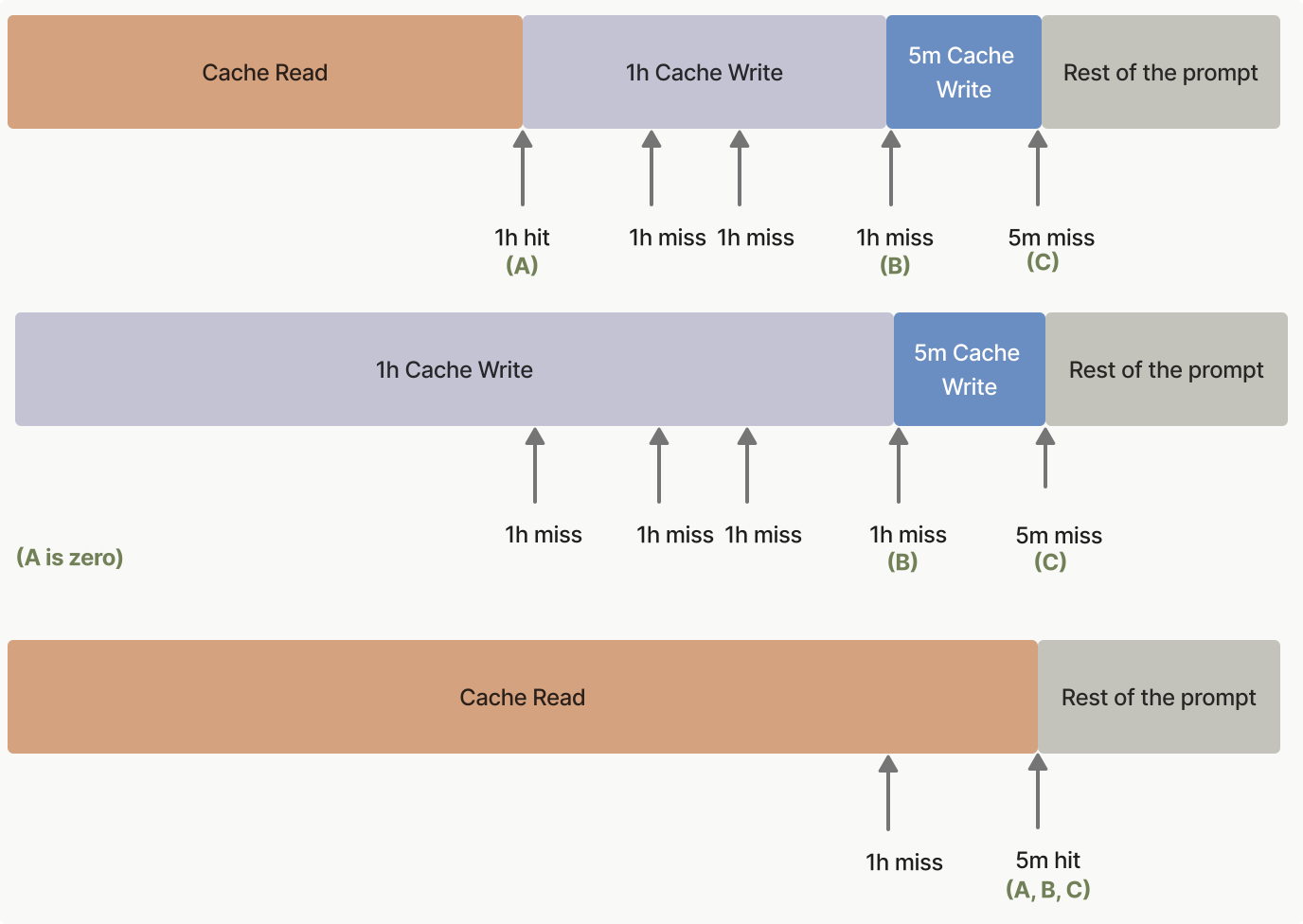
Pre-warming the cache
Cache pre-warming lets you load your system prompt or tool definitions into the prompt cache before a user triggers a real request. This eliminates the cache-miss latency penalty on the first user interaction, reducing time-to-first-token (TTFT) for latency-sensitive applications.
How it works
Set max_tokens: 0 in your request. The API reads your prompt into the model and writes the cache at any cache_control breakpoint, then returns immediately without generating any output. The response has an empty content array, stop_reason: "max_tokens", and a fully populated usage block.
Place the cache_control breakpoint on the last block that is shared with the follow-up request (typically your system prompt or tool definitions), not on the placeholder user message. Otherwise the cache entry is keyed to the placeholder and the follow-up request won't hit it. Use the same thinking configuration and output_config.effort as your follow-up requests too: those values are rendered into the prompt (see What invalidates the cache), so a pre-warm with a different configuration can write an entry your real traffic never hits. This means using an explicit cache breakpoint rather than automatic caching, since automatic caching places the breakpoint on the last block, which here is the placeholder. The placeholder user message can be any string with non-whitespace content (the examples here use "warmup"); its content is read into the model but never answered.
Note: A pre-warm request incurs a cache write charge if the prefix is not already cached, the same as any other request. Check
usage.cache_creation_input_tokensin the response to confirm a write occurred. Zero output tokens are billed.
  curl https://haijun.my.id/v1/messages \
    -H "content-type: application/json" \
    -H "x-api-key: $JUGLOW_API_KEY" \
    -H "juglow-version: 2023-06-01" \
    -d '{
      "model": "haijun-opus-5-5",
      "max_tokens": 0,
      "system": [
        {
          "type": "text",
          "text": "You are an expert software engineer with deep knowledge of distributed systems...",
          "cache_control": {"type": "ephemeral"}
        }
      ],
      "messages": [{"role": "user", "content": "warmup"}]
}' ant messages create \
--transform '{stop_reason,content,usage}' --format yaml <<'YAML'
model: haijun-opus-5-5
max_tokens: 0
system:
- type: text
text: >-
You are an expert software engineer with deep knowledge of
distributed systems...
cache_control:
type: ephemeral
messages:
- role: user
content: warmup
YAML client = juglow.Juglow()
# Fire this before users arrive to warm the shared system-prompt cache.
prewarm = client.messages.create(
model="haijun-opus-5-5",
max_tokens=0,
system=[
{
"type": "text",
"text": "You are an expert software engineer with deep knowledge of distributed systems...",
"cache_control": {"type": "ephemeral"},
}
],
messages=[{"role": "user", "content": "warmup"}],
)
print(prewarm.stop_reason) # "max_tokens"
print(prewarm.content) # []
print(prewarm.usage) const client = new Juglow();
// Fire this before users arrive to warm the shared system-prompt cache.
const prewarm = await client.messages.create({
model: "haijun-opus-5-5",
max_tokens: 0,
system: [
{
type: "text",
text: "You are an expert software engineer with deep knowledge of distributed systems...",
cache_control: { type: "ephemeral" }
}
],
messages: [{ role: "user", content: "warmup" }]
});
console.log(prewarm.stop_reason); // "max_tokens"
console.log(prewarm.content); // []
console.log(prewarm.usage); JuglowClient client = new();
var prewarm = await client.Messages.Create(
new()
{
Model = Model.HaijunOpus5_5,
MaxTokens = 0,
System = new(
[
new TextBlockParam
{
Text = "You are an expert software engineer with deep knowledge of distributed systems...",
CacheControl = new(),
},
]
),
Messages = [new() { Role = Role.User, Content = "warmup" }],
}
);
Console.WriteLine(prewarm.StopReason?.Raw()); // "max_tokens"
Console.WriteLine(prewarm.Content.Count); // 0
Console.WriteLine(prewarm.Usage); client := juglow.NewClient()
prewarm, err := client.Messages.New(context.TODO(), juglow.MessageNewParams{
Model: juglow.ModelHaijunOpus5_5,
MaxTokens: 0,
System: []juglow.TextBlockParam{
{
Text: "You are an expert software engineer with deep knowledge of distributed systems...",
CacheControl: juglow.NewCacheControlEphemeralParam(),
},
},
Messages: []juglow.MessageParam{
juglow.NewUserMessage(juglow.NewTextBlock("warmup")),
},
})
if err != nil {
panic(err)
}
fmt.Println(prewarm.StopReason) // "max_tokens"
fmt.Println(prewarm.Content) // []
fmt.Println(prewarm.Usage.RawJSON()) JuglowClient client = JuglowOkHttpClient.fromEnv();
Message prewarm = client.messages().create(MessageCreateParams.builder()
.model(Model.HAIJUN_OPUS_5_5)
.maxTokens(0)
.systemOfTextBlockParams(List.of(TextBlockParam.builder()
.text("You are an expert software engineer with deep knowledge of distributed systems...")
.cacheControl(CacheControlEphemeral.builder().build())
.build()))
.addUserMessage("warmup")
.build());
IO.println(prewarm.stopReason()); // Optional[max_tokens]
IO.println(prewarm.content()); // []
IO.println(prewarm.usage()); $client = new Client();
$prewarm = $client->messages->create(
model: Model::HAIJUN_OPUS_5_5,
maxTokens: 0,
system: [
[
'type' => 'text',
'text' => 'You are an expert software engineer with deep knowledge of distributed systems...',
'cache_control' => ['type' => 'ephemeral'],
],
],
messages: [['role' => 'user', 'content' => 'warmup']],
);
echo $prewarm->stopReason, PHP_EOL; // "max_tokens"
echo json_encode($prewarm->content), PHP_EOL; // []
echo json_encode($prewarm->usage), PHP_EOL; client = Juglow::Client.new
prewarm = client.messages.create(
model: Juglow::Model::HAIJUN_OPUS_5_5,
max_tokens: 0,
system_: [
{
type: "text",
text: "You are an expert software engineer with deep knowledge of distributed systems...",
cache_control: {type: "ephemeral"}
}
],
messages: [{role: "user", content: "warmup"}]
)
puts prewarm.stop_reason # :max_tokens
puts prewarm.content # []
puts prewarm.usageThe API returns an empty content array:
{
  "id": "msg_01XFDUDYJgAACzvnptvVoYEL",
  "type": "message",
  "role": "assistant",
  "content": [],
  "model": "haijun-opus-5-5",
  "stop_reason": "max_tokens",
  "stop_sequence": null,
  "usage": {
    "input_tokens": 8,
    "cache_creation_input_tokens": 5120,
    "cache_read_input_tokens": 0,
    "cache_creation": {
      "ephemeral_5m_input_tokens": 5120,
      "ephemeral_1h_input_tokens": 0
    },
    "iterations": [
      {
        "input_tokens": 8,
        "output_tokens": 0,
        "cache_read_input_tokens": 0,
        "cache_creation_input_tokens": 5120,
        "cache_creation": {
          "ephemeral_5m_input_tokens": 5120,
          "ephemeral_1h_input_tokens": 0
        },
        "type": "message"
      }
    ],
    "output_tokens": 0,
    "service_tier": "standard",
    "inference_geo": "global"
  }
}Typical usage pattern
Fire a pre-warm request when your application starts (or on a scheduled interval), then send real user requests after the pre-warm completes:
  # Warm the cache at application startup or on a scheduled interval.
  curl https://haijun.my.id/v1/messages \
    -H "content-type: application/json" \
    -H "x-api-key: $JUGLOW_API_KEY" \
    -H "juglow-version: 2023-06-01" \
    -d '{
      "model": "haijun-opus-5-5",
      "max_tokens": 0,
      "system": [
        {
          "type": "text",
          "text": "You are an expert software engineer with deep knowledge of distributed systems...",
          "cache_control": {"type": "ephemeral"}
        }
      ],
      "messages": [{"role": "user", "content": "warmup"}]
    }'

  # Later, when the user submits a message, the system-prompt prefix is already cached.
  curl https://haijun.my.id/v1/messages \
    -H "content-type: application/json" \
    -H "x-api-key: $JUGLOW_API_KEY" \
    -H "juglow-version: 2023-06-01" \
    -d '{
      "model": "haijun-opus-5-5",
      "max_tokens": 1024,
      "system": [
        {
          "type": "text",
          "text": "You are an expert software engineer with deep knowledge of distributed systems...",
          "cache_control": {"type": "ephemeral"}
        }
      ],
      "messages": [{"role": "user", "content": "How do I implement a binary search tree?"}]
}' # Warm the cache at application startup or on a scheduled interval.
ant messages create --transform usage <<'YAML'
model: haijun-opus-5-5
max_tokens: 0
system:
- type: text
text: >-
You are an expert software engineer with deep knowledge of
distributed systems...
cache_control:
type: ephemeral
messages:
- role: user
content: warmup
YAML
# Later, when the user submits a message, the system-prompt prefix is already cached.
ant messages create --transform 'content.#(type=="text").text' --raw-output <<'YAML'
model: haijun-opus-5-5
max_tokens: 1024
system:
- type: text
text: >-
You are an expert software engineer with deep knowledge of
distributed systems...
cache_control:
type: ephemeral
messages:
- role: user
content: How do I implement a binary search tree?
YAML client = juglow.Juglow()
SYSTEM_PROMPT = [
{
"type": "text",
"text": "You are an expert software engineer with deep knowledge of distributed systems...",
"cache_control": {"type": "ephemeral"},
}
]
def prewarm_cache() -> None:
"""Call this at application startup or on a scheduled interval."""
client.messages.create(
model="haijun-opus-5-5",
max_tokens=0,
system=SYSTEM_PROMPT,
messages=[{"role": "user", "content": "warmup"}],
)
def respond(user_message: str) -> juglow.types.Message:
"""The real user request; benefits from a warm cache."""
return client.messages.create(
model="haijun-opus-5-5",
max_tokens=1024,
system=SYSTEM_PROMPT,
messages=[{"role": "user", "content": user_message}],
)
# Warm the cache before any user traffic arrives.
prewarm_cache()
# Later, when the user submits a message, the system-prompt prefix is already cached.
response = respond("How do I implement a binary search tree?")
for block in response.content:
if block.type == "text":
print(block.text) const client = new Juglow();
const SYSTEM_PROMPT: Juglow.TextBlockParam[] = [
{
type: "text",
text: "You are an expert software engineer with deep knowledge of distributed systems...",
cache_control: { type: "ephemeral" }
}
];
// Call this at application startup or on a scheduled interval.
async function prewarmCache(): Promise<void> {
await client.messages.create({
model: "haijun-opus-5-5",
max_tokens: 0,
system: SYSTEM_PROMPT,
messages: [{ role: "user", content: "warmup" }]
});
}
// The real user request; benefits from a warm cache.
async function respond(userMessage: string): Promise<Juglow.Message> {
return client.messages.create({
model: "haijun-opus-5-5",
max_tokens: 1024,
system: SYSTEM_PROMPT,
messages: [{ role: "user", content: userMessage }]
});
}
// Warm the cache before any user traffic arrives.
await prewarmCache();
// Later, when the user submits a message, the system-prompt prefix is already cached.
const response = await respond("How do I implement a binary search tree?");
const textBlock = response.content.find(
(block): block is Juglow.TextBlock => block.type === "text"
);
console.log(textBlock?.text); JuglowClient client = new();
List<TextBlockParam> systemPrompt =
[
new TextBlockParam
{
Text = "You are an expert software engineer with deep knowledge of distributed systems...",
CacheControl = new(),
},
];
// Call this at application startup or on a scheduled interval.
async Task PrewarmCache() =>
await client.Messages.Create(
new()
{
Model = Model.HaijunOpus5_5,
MaxTokens = 0,
System = new(systemPrompt),
Messages = [new() { Role = Role.User, Content = "warmup" }],
}
);
// The real user request; benefits from a warm cache.
async Task<Message> Respond(string userMessage) =>
await client.Messages.Create(
new()
{
Model = Model.HaijunOpus5_5,
MaxTokens = 1024,
System = new(systemPrompt),
Messages = [new() { Role = Role.User, Content = userMessage }],
}
);
// Warm the cache before any user traffic arrives.
await PrewarmCache();
// Later, when the user submits a message, the system-prompt prefix is already cached.
var response = await Respond("How do I implement a binary search tree?");
foreach (var block in response.Content)
{
if (block.TryPickText(out var textBlock))
{
Console.WriteLine(textBlock.Text);
}
} var client = juglow.NewClient()
var systemPrompt = []juglow.TextBlockParam{
{
Text: "You are an expert software engineer with deep knowledge of distributed systems...",
CacheControl: juglow.NewCacheControlEphemeralParam(),
},
}
// Call this at application startup or on a scheduled interval.
func prewarmCache() error {
_, err := client.Messages.New(context.TODO(), juglow.MessageNewParams{
Model: juglow.ModelHaijunOpus5_5,
MaxTokens: 0,
System: systemPrompt,
Messages: []juglow.MessageParam{
juglow.NewUserMessage(juglow.NewTextBlock("warmup")),
},
})
return err
}
// The real user request; benefits from a warm cache.
func respond(userMessage string) (*juglow.Message, error) {
return client.Messages.New(context.TODO(), juglow.MessageNewParams{
Model: juglow.ModelHaijunOpus5_5,
MaxTokens: 1024,
System: systemPrompt,
Messages: []juglow.MessageParam{
juglow.NewUserMessage(juglow.NewTextBlock(userMessage)),
},
})
}
func main() {
// Warm the cache before any user traffic arrives.
if err := prewarmCache(); err != nil {
log.Fatal(err)
}
// Later, when the user submits a message, the system-prompt prefix is already cached.
response, err := respond("How do I implement a binary search tree?")
if err != nil {
log.Fatal(err)
}
for _, block := range response.Content {
if textBlock, ok := block.AsAny().(juglow.TextBlock); ok {
fmt.Println(textBlock.Text)
}
}
} JuglowClient client = JuglowOkHttpClient.fromEnv();
List<TextBlockParam> systemPrompt = List.of(TextBlockParam.builder()
.text("You are an expert software engineer with deep knowledge of distributed systems...")
.cacheControl(CacheControlEphemeral.builder().build())
.build());
// Call this at application startup or on a scheduled interval.
void prewarmCache() {
client.messages().create(MessageCreateParams.builder()
.model(Model.HAIJUN_OPUS_5_5)
.maxTokens(0)
.systemOfTextBlockParams(systemPrompt)
.addUserMessage("warmup")
.build());
}
// The real user request; benefits from a warm cache.
Message respond(String userMessage) {
return client.messages().create(MessageCreateParams.builder()
.model(Model.HAIJUN_OPUS_5_5)
.maxTokens(1024)
.systemOfTextBlockParams(systemPrompt)
.addUserMessage(userMessage)
.build());
}
void main() {
// Warm the cache before any user traffic arrives.
prewarmCache();
// Later, when the user submits a message, the system-prompt prefix is already cached.
Message response = respond("How do I implement a binary search tree?");
response.content().stream()
.flatMap(block -> block.text().stream())
.forEach(textBlock -> IO.println(textBlock.text()));
} $client = new Client();
$systemPrompt = [
[
'type' => 'text',
'text' => 'You are an expert software engineer with deep knowledge of distributed systems...',
'cache_control' => ['type' => 'ephemeral'],
],
];
// Call this at application startup or on a scheduled interval.
$prewarmCache = fn () => $client->messages->create(
model: Model::HAIJUN_OPUS_5_5,
maxTokens: 0,
system: $systemPrompt,
messages: [['role' => 'user', 'content' => 'warmup']],
);
// The real user request; benefits from a warm cache.
$respond = fn (string $userMessage) => $client->messages->create(
model: Model::HAIJUN_OPUS_5_5,
maxTokens: 1024,
system: $systemPrompt,
messages: [['role' => 'user', 'content' => $userMessage]],
);
// Warm the cache before any user traffic arrives.
$prewarmCache();
// Later, when the user submits a message, the system-prompt prefix is already cached.
$response = $respond('How do I implement a binary search tree?');
foreach ($response->content as $block) {
if ($block->type === 'text') {
echo $block->text, PHP_EOL;
}
} client = Juglow::Client.new
SYSTEM_PROMPT = [
{
type: "text",
text: "You are an expert software engineer with deep knowledge of distributed systems...",
cache_control: {type: "ephemeral"}
}
]
# Call this at application startup or on a scheduled interval.
def prewarm_cache(client)
client.messages.create(
model: Juglow::Model::HAIJUN_OPUS_5_5,
max_tokens: 0,
system_: SYSTEM_PROMPT,
messages: [{role: "user", content: "warmup"}]
)
end
# The real user request; benefits from a warm cache.
def respond(client, user_message)
client.messages.create(
model: Juglow::Model::HAIJUN_OPUS_5_5,
max_tokens: 1024,
system_: SYSTEM_PROMPT,
messages: [{role: "user", content: user_message}]
)
end
# Warm the cache before any user traffic arrives.
prewarm_cache(client)
# Later, when the user submits a message, the system-prompt prefix is already cached.
response = respond(client, "How do I implement a binary search tree?")
response.content.each do |block|
puts block.text if block.type == :text
endKeep in mind that the cache TTL still applies. For the default 5-minute cache, send a new pre-warm request at least every 5 minutes to keep the cache warm. For longer gaps between user requests, use the 1-hour cache duration instead.
Limitations
A max_tokens: 0 request is rejected with an invalid_request_error if any of the following are set, since each implies output that a zero-token budget cannot produce:
stream: true
- Extended thinking (
thinking.type: "enabled")
- Structured outputs (
output_config.format)
tool_choiceof{"type": "tool", ...}or{"type": "any"}
max_tokens: 0 is also rejected inside a Message Batches request. Pre-warming targets time-to-first-token, which does not apply to batch processing, and a cache entry written during batch processing would likely expire before the follow-up request runs.
Replacing the max\_tokens=1 workaround
Before max_tokens: 0 was available, some applications used max_tokens: 1 warm-up calls to achieve the same effect. The max_tokens: 0 approach is preferred: no output is produced, so there is no single-token reply to discard, no output tokens are billed, and the intent of the request is unambiguous.
Prompt caching examples
To help you get started with prompt caching, the prompt caching cookbook provides detailed examples and best practices.
The following code snippets showcase various prompt caching patterns. These examples demonstrate how to implement caching in different scenarios, helping you understand the practical applications of this feature:
#### Large context caching example
      curl https://haijun.my.id/v1/messages \
        -H "x-api-key: $JUGLOW_API_KEY" \
        -H "juglow-version: 2023-06-01" \
        -H "content-type: application/json" \
        -d '{
          "model": "haijun-opus-5-5",
          "max_tokens": 1024,
          "system": [
            {
              "type": "text",
              "text": "You are an AI assistant tasked with analyzing legal documents."
            },
            {
              "type": "text",
              "text": "Here is the full text of a complex legal agreement: [Insert full text of a 50-page legal agreement here]",
              "cache_control": {"type": "ephemeral"}
            }
          ],
          "messages": [
            {
              "role": "user",
              "content": "What are the key terms and conditions in this agreement?"
            }
          ]
}' ant messages create --transform usage <<'YAML'
model: haijun-opus-5-5
max_tokens: 1024
system:
- type: text
text: You are an AI assistant tasked with analyzing legal documents.
- type: text
text: >-
Here is the full text of a complex legal agreement:
[Insert full text of a 50-page legal agreement here]
cache_control:
type: ephemeral
messages:
- role: user
content: What are the key terms and conditions in this agreement?
YAML client = juglow.Juglow()
response = client.messages.create(
model="haijun-opus-5-5",
max_tokens=1024,
system=[
{
"type": "text",
"text": "You are an AI assistant tasked with analyzing legal documents.",
},
{
"type": "text",
"text": "Here is the full text of a complex legal agreement: [Insert full text of a 50-page legal agreement here]",
"cache_control": {"type": "ephemeral"},
},
],
messages=[
{
"role": "user",
"content": "What are the key terms and conditions in this agreement?",
}
],
)
print(response.usage.model_dump_json()) const client = new Juglow();
const response = await client.messages.create({
model: "haijun-opus-5-5",
max_tokens: 1024,
system: [
{
type: "text",
text: "You are an AI assistant tasked with analyzing legal documents."
},
{
type: "text",
text: "Here is the full text of a complex legal agreement: [Insert full text of a 50-page legal agreement here]",
cache_control: { type: "ephemeral" }
}
],
messages: [
{
role: "user",
content: "What are the key terms and conditions in this agreement?"
}
]
});
console.log(response.usage); JuglowClient client = new()
{
ApiKey = Environment.GetEnvironmentVariable("JUGLOW_API_KEY")
};
var parameters = new MessageCreateParams
{
Model = Model.HaijunOpus5_5,
MaxTokens = 1024,
System = new MessageCreateParamsSystem(new List<TextBlockParam>
{
new TextBlockParam()
{
Text = "You are an AI assistant tasked with analyzing legal documents.",
},
new TextBlockParam()
{
Text = "Here is the full text of a complex legal agreement: [Insert full text of a 50-page legal agreement here]",
CacheControl = new CacheControlEphemeral(),
},
}),
Messages =
[
new()
{
Role = Role.User,
Content = "What are the key terms and conditions in this agreement?"
}
]
};
var message = await client.Messages.Create(parameters);
Console.WriteLine(message.Usage); client := juglow.NewClient()
response, err := client.Messages.New(context.TODO(), juglow.MessageNewParams{
Model: juglow.ModelHaijunOpus5_5,
MaxTokens: 1024,
System: []juglow.TextBlockParam{
{
Text: "You are an AI assistant tasked with analyzing legal documents.",
},
{
Text: "Here is the full text of a complex legal agreement: [Insert full text of a 50-page legal agreement here]",
CacheControl: juglow.NewCacheControlEphemeralParam(),
},
},
Messages: []juglow.MessageParam{
juglow.NewUserMessage(juglow.NewTextBlock("What are the key terms and conditions in this agreement?")),
},
})
if err != nil {
log.Fatal(err)
}
fmt.Println(response.Usage.RawJSON()) import com.juglow.models.messages.CacheControlEphemeral;
// ...
public class LegalDocumentAnalysisExample {
public static void main(String[] args) {
JuglowClient client = JuglowOkHttpClient.fromEnv();
MessageCreateParams params = MessageCreateParams.builder()
.model(Model.HAIJUN_OPUS_5_5)
.maxTokens(1024)
.systemOfTextBlockParams(
List.of(
TextBlockParam.builder()
.text("You are an AI assistant tasked with analyzing legal documents.")
.build(),
TextBlockParam.builder()
.text(
"Here is the full text of a complex legal agreement: [Insert full text of a 50-page legal agreement here]"
)
.cacheControl(CacheControlEphemeral.builder().build())
.build()
)
)
.addUserMessage("What are the key terms and conditions in this agreement?")
.build();
Message message = client.messages().create(params);
System.out.println(message.usage());
}
} $client = new Client();
$message = $client->messages->create(
maxTokens: 1024,
messages: [
[
'role' => 'user',
'content' => 'What are the key terms and conditions in this agreement?'
]
],
model: 'haijun-opus-5-5',
system: [
[
'type' => 'text',
'text' => 'You are an AI assistant tasked with analyzing legal documents.'
],
[
'type' => 'text',
'text' => 'Here is the full text of a complex legal agreement: [Insert full text of a 50-page legal agreement here]',
'cache_control' => ['type' => 'ephemeral']
]
],
);
echo json_encode($message->usage), PHP_EOL; client = Juglow::Client.new
message = client.messages.create(
model: "haijun-opus-5-5",
max_tokens: 1024,
system: [
{
type: "text",
text: "You are an AI assistant tasked with analyzing legal documents."
},
{
type: "text",
text: "Here is the full text of a complex legal agreement: [Insert full text of a 50-page legal agreement here]",
cache_control: { type: "ephemeral" }
}
],
messages: [
{
role: "user",
content: "What are the key terms and conditions in this agreement?"
}
]
)
puts message.usageThis example demonstrates basic prompt caching usage, caching the full text of the legal agreement as a prefix while keeping the user instruction uncached.
For the first request:
input_tokens: Number of tokens in the user message onlycache_creation_input_tokens: Number of tokens in the entire system message, including the legal documentcache_read_input_tokens: 0 (no cache hit on first request)
For subsequent requests within the cache lifetime:
input_tokens: Number of tokens in the user message onlycache_creation_input_tokens: 0 (no new cache creation)cache_read_input_tokens: Number of tokens in the entire cached system message
#### Caching tool definitions
Tool definitions can be cached by placing cache_control on the last tool in your tools array. All tools defined before and including that tool are cached as a single prefix.
    {
      "model": "haijun-opus-5-5",
      "max_tokens": 1024,
      "tools": [
        {
          "name": "get_weather",
          "description": "Get the current weather in a given location",
          "input_schema": {
            "type": "object",
            "properties": { "location": { "type": "string" } },
            "required": ["location"]
          }
        },
        {
          "name": "get_time",
          "description": "Get the current time in a given time zone",
          "input_schema": {
            "type": "object",
            "properties": { "timezone": { "type": "string" } },
            "required": ["timezone"]
          },
          "cache_control": { "type": "ephemeral" }
        }
      ],
      "messages": [{ "role": "user", "content": "What is the weather and time in New York?" }]
    }
On the first request, cache_creation_input_tokens reflects the token count of all tool definitions. On subsequent requests within the cache lifetime, those tokens appear under cache_read_input_tokens instead.
For detailed interaction between tool definitions, defer_loading, and cache invalidation, see Tool use with prompt caching.
#### Continuing a multi-turn conversation
      curl https://haijun.my.id/v1/messages \
        -H "x-api-key: $JUGLOW_API_KEY" \
        -H "juglow-version: 2023-06-01" \
        -H "content-type: application/json" \
        -d '{
          "model": "haijun-opus-5-5",
          "max_tokens": 1024,
          "system": [
            {
              "type": "text",
              "text": "...long system prompt",
              "cache_control": {"type": "ephemeral"}
            }
          ],
          "messages": [
            {
              "role": "user",
              "content": [
                {
                  "type": "text",
                  "text": "Hello, can you tell me more about the solar system?"
                }
              ]
            },
            {
              "role": "assistant",
              "content": "Certainly! The solar system is the collection of celestial bodies that orbit our Sun. It consists of eight planets, numerous moons, asteroids, comets, and other objects. The planets, in order from closest to farthest from the Sun, are: Mercury, Venus, Earth, Mars, Jupiter, Saturn, Uranus, and Neptune. Each planet has its own unique characteristics and features. Is there a specific aspect of the solar system you would like to know more about?"
            },
            {
              "role": "user",
              "content": [
                {
                  "type": "text",
                  "text": "Good to know."
                },
                {
                  "type": "text",
                  "text": "Tell me more about Mars.",
                  "cache_control": {"type": "ephemeral"}
                }
              ]
            }
          ]
}' ant messages create --transform usage <<'YAML'
model: haijun-opus-5-5
max_tokens: 1024
system:
- type: text
text: "...long system prompt"
cache_control:
type: ephemeral
messages:
- role: user
content:
- type: text
text: Hello, can you tell me more about the solar system?
- role: assistant
content: >-
Certainly! The solar system is the collection of celestial bodies that
orbit our Sun. It consists of eight planets, numerous moons, asteroids,
comets, and other objects. The planets, in order from closest to farthest
from the Sun, are: Mercury, Venus, Earth, Mars, Jupiter, Saturn, Uranus,
and Neptune. Each planet has its own unique characteristics and features.
Is there a specific aspect of the solar system you would like to know
more about?
- role: user
content:
- type: text
text: Good to know.
- type: text
text: Tell me more about Mars.
cache_control:
type: ephemeral
YAML client = juglow.Juglow()
response = client.messages.create(
model="haijun-opus-5-5",
max_tokens=1024,
system=[
{
"type": "text",
"text": "...long system prompt",
"cache_control": {"type": "ephemeral"},
}
],
messages=[
# ...long conversation so far
{
"role": "user",
"content": [
{
"type": "text",
"text": "Hello, can you tell me more about the solar system?",
}
],
},
{
"role": "assistant",
"content": "Certainly! The solar system is the collection of celestial bodies that orbit our Sun. It consists of eight planets, numerous moons, asteroids, comets, and other objects. The planets, in order from closest to farthest from the Sun, are: Mercury, Venus, Earth, Mars, Jupiter, Saturn, Uranus, and Neptune. Each planet has its own unique characteristics and features. Is there a specific aspect of the solar system you'd like to know more about?",
},
{
"role": "user",
"content": [
{"type": "text", "text": "Good to know."},
{
"type": "text",
"text": "Tell me more about Mars.",
"cache_control": {"type": "ephemeral"},
},
],
},
],
)
print(response.usage.model_dump_json()) const client = new Juglow();
const response = await client.messages.create({
model: "haijun-opus-5-5",
max_tokens: 1024,
system: [
{
type: "text",
text: "...long system prompt",
cache_control: { type: "ephemeral" }
}
],
messages: [
// ...long conversation so far
{
role: "user",
content: [
{
type: "text",
text: "Hello, can you tell me more about the solar system?"
}
]
},
{
role: "assistant",
content:
"Certainly! The solar system is the collection of celestial bodies that orbit our Sun. It consists of eight planets, numerous moons, asteroids, comets, and other objects. The planets, in order from closest to farthest from the Sun, are: Mercury, Venus, Earth, Mars, Jupiter, Saturn, Uranus, and Neptune. Each planet has its own unique characteristics and features. Is there a specific aspect of the solar system you'd like to know more about?"
},
{
role: "user",
content: [
{
type: "text",
text: "Good to know."
},
{
type: "text",
text: "Tell me more about Mars.",
cache_control: { type: "ephemeral" }
}
]
}
]
});
console.log(response.usage); JuglowClient client = new();
var parameters = new MessageCreateParams
{
Model = Model.HaijunOpus5_5,
MaxTokens = 1024,
System = new MessageCreateParamsSystem(new List<TextBlockParam>
{
new TextBlockParam()
{
Text = "...long system prompt",
CacheControl = new CacheControlEphemeral(),
},
}),
Messages =
[
new()
{
Role = Role.User,
Content = new MessageParamContent(new List<ContentBlockParam>
{
new ContentBlockParam(new TextBlockParam("Hello, can you tell me more about the solar system?")),
}),
},
new()
{
Role = Role.Assistant,
Content = "Certainly! The solar system is the collection of celestial bodies that orbit our Sun. It consists of eight planets, numerous moons, asteroids, comets, and other objects. The planets, in order from closest to farthest from the Sun, are: Mercury, Venus, Earth, Mars, Jupiter, Saturn, Uranus, and Neptune. Each planet has its own unique characteristics and features. Is there a specific aspect of the solar system you would like to know more about?"
},
new()
{
Role = Role.User,
Content = new MessageParamContent(new List<ContentBlockParam>
{
new ContentBlockParam(new TextBlockParam("Good to know.")),
new ContentBlockParam(new TextBlockParam()
{
Text = "Tell me more about Mars.",
CacheControl = new CacheControlEphemeral(),
}),
})
}
]
};
var message = await client.Messages.Create(parameters);
Console.WriteLine(message.Usage); client := juglow.NewClient()
response, err := client.Messages.New(context.TODO(), juglow.MessageNewParams{
Model: juglow.ModelHaijunOpus5_5,
MaxTokens: 1024,
System: []juglow.TextBlockParam{
{
Text: "...long system prompt",
CacheControl: juglow.NewCacheControlEphemeralParam(),
},
},
Messages: []juglow.MessageParam{
juglow.NewUserMessage(juglow.NewTextBlock("Hello, can you tell me more about the solar system?")),
juglow.NewAssistantMessage(juglow.NewTextBlock("Certainly! The solar system is the collection of celestial bodies that orbit our Sun. It consists of eight planets, numerous moons, asteroids, comets, and other objects. The planets, in order from closest to farthest from the Sun, are: Mercury, Venus, Earth, Mars, Jupiter, Saturn, Uranus, and Neptune. Each planet has its own unique characteristics and features. Is there a specific aspect of the solar system you would like to know more about?")),
{
Role: juglow.MessageParamRoleUser,
Content: []juglow.ContentBlockParamUnion{
juglow.NewTextBlock("Good to know."),
{OfText: &juglow.TextBlockParam{
Text: "Tell me more about Mars.",
CacheControl: juglow.NewCacheControlEphemeralParam(),
}},
},
},
},
})
if err != nil {
log.Fatal(err)
}
fmt.Println(response.Usage.RawJSON()) import com.juglow.models.messages.CacheControlEphemeral;
// ...
public class ConversationWithCacheControlExample {
public static void main(String[] args) {
JuglowClient client = JuglowOkHttpClient.fromEnv();
// Create ephemeral system prompt
TextBlockParam systemPrompt = TextBlockParam.builder()
.text("...long system prompt")
.cacheControl(CacheControlEphemeral.builder().build())
.build();
// Create message params
MessageCreateParams params = MessageCreateParams.builder()
.model(Model.HAIJUN_OPUS_5_5)
.maxTokens(1024)
.systemOfTextBlockParams(List.of(systemPrompt))
// First user message (without cache control)
.addUserMessage("Hello, can you tell me more about the solar system?")
// Assistant response
.addAssistantMessage(
"Certainly! The solar system is the collection of celestial bodies that orbit our Sun. It consists of eight planets, numerous moons, asteroids, comets, and other objects. The planets, in order from closest to farthest from the Sun, are: Mercury, Venus, Earth, Mars, Jupiter, Saturn, Uranus, and Neptune. Each planet has its own unique characteristics and features. Is there a specific aspect of the solar system you would like to know more about?"
)
// Second user message (with cache control)
.addUserMessageOfBlockParams(
List.of(
ContentBlockParam.ofText(TextBlockParam.builder().text("Good to know.").build()),
ContentBlockParam.ofText(
TextBlockParam.builder()
.text("Tell me more about Mars.")
.cacheControl(CacheControlEphemeral.builder().build())
.build()
)
)
)
.build();
Message message = client.messages().create(params);
System.out.println(message.usage());
}
} $client = new Client();
$message = $client->messages->create(
maxTokens: 1024,
messages: [
[
'role' => 'user',
'content' => [
[
'type' => 'text',
'text' => 'Hello, can you tell me more about the solar system?'
]
]
],
[
'role' => 'assistant',
'content' => "Certainly! The solar system is the collection of celestial bodies that orbit our Sun. It consists of eight planets, numerous moons, asteroids, comets, and other objects. The planets, in order from closest to farthest from the Sun, are: Mercury, Venus, Earth, Mars, Jupiter, Saturn, Uranus, and Neptune. Each planet has its own unique characteristics and features. Is there a specific aspect of the solar system you would like to know more about?"
],
[
'role' => 'user',
'content' => [
['type' => 'text', 'text' => 'Good to know.'],
[
'type' => 'text',
'text' => 'Tell me more about Mars.',
'cache_control' => ['type' => 'ephemeral']
]
]
]
],
model: 'haijun-opus-5-5',
system: [
[
'type' => 'text',
'text' => '...long system prompt',
'cache_control' => ['type' => 'ephemeral']
]
],
);
echo json_encode($message->usage), PHP_EOL; client = Juglow::Client.new
message = client.messages.create(
model: "haijun-opus-5-5",
max_tokens: 1024,
system: [
{
type: "text",
text: "...long system prompt",
cache_control: { type: "ephemeral" }
}
],
messages: [
{
role: "user",
content: [
{
type: "text",
text: "Hello, can you tell me more about the solar system?"
}
]
},
{
role: "assistant",
content: "Certainly! The solar system is the collection of celestial bodies that orbit our Sun. It consists of eight planets, numerous moons, asteroids, comets, and other objects. The planets, in order from closest to farthest from the Sun, are: Mercury, Venus, Earth, Mars, Jupiter, Saturn, Uranus, and Neptune. Each planet has its own unique characteristics and features. Is there a specific aspect of the solar system you would like to know more about?"
},
{
role: "user",
content: [
{ type: "text", text: "Good to know." },
{
type: "text",
text: "Tell me more about Mars.",
cache_control: { type: "ephemeral" }
}
]
}
]
)
puts message.usageThis example demonstrates how to use prompt caching in a multi-turn conversation.
During each turn, the final block of the final message is marked with cache_control so the conversation can be incrementally cached. The system automatically looks up and uses the longest previously cached sequence of blocks for follow-up messages. That is, blocks that were previously marked with a cache_control block are later not marked with this, but they will still be considered a cache hit (and also a cache refresh!) if they are hit within 5 minutes.
In addition, note that the cache_control parameter is placed on the system message. This is to ensure that if this gets evicted from the cache (after not being used for more than 5 minutes), it will get added back to the cache on the next request.
This approach is useful for maintaining context in ongoing conversations without repeatedly processing the same information.
When this is set up properly, you should see the following in the usage response of each request:
input_tokens: Number of tokens in the new user message (will be minimal)cache_creation_input_tokens: Number of tokens in the new assistant and user turnscache_read_input_tokens: Number of tokens in the conversation up to the previous turn
#### Putting it all together: Multiple cache breakpoints
      curl https://haijun.my.id/v1/messages \
        -H "x-api-key: $JUGLOW_API_KEY" \
        -H "juglow-version: 2023-06-01" \
        -H "content-type: application/json" \
        -d '{
          "model": "haijun-opus-5-5",
          "max_tokens": 1024,
          "tools": [
            {
              "name": "search_documents",
              "description": "Search through the knowledge base",
              "input_schema": {
                "type": "object",
                "properties": {
                  "query": {
                    "type": "string",
                    "description": "Search query"
                  }
                },
                "required": ["query"]
              }
            },
            {
              "name": "get_document",
              "description": "Retrieve a specific document by ID",
              "input_schema": {
                "type": "object",
                "properties": {
                  "doc_id": {
                    "type": "string",
                    "description": "Document ID"
                  }
                },
                "required": ["doc_id"]
              },
              "cache_control": {"type": "ephemeral"}
            }
          ],
          "system": [
            {
              "type": "text",
              "text": "You are a helpful research assistant with access to a document knowledge base.\n\n# Instructions\n- Always search for relevant documents before answering\n- Provide citations for your sources\n- Be objective and accurate in your responses\n- If multiple documents contain relevant information, synthesize them\n- Acknowledge when information is not available in the knowledge base",
              "cache_control": {"type": "ephemeral"}
            },
            {
              "type": "text",
              "text": "# Knowledge Base Context\n\nHere are the relevant documents for this conversation:\n\n## Document 1: Solar System Overview\nThe solar system consists of the Sun and all objects that orbit it...\n\n## Document 2: Planetary Characteristics\nEach planet has unique features. Mercury is the smallest planet...\n\n## Document 3: Mars Exploration\nMars has been a target of exploration for decades...\n\n[Additional documents...]",
              "cache_control": {"type": "ephemeral"}
            }
          ],
          "messages": [
            {
              "role": "user",
              "content": "Can you search for information about Mars rovers?"
            },
            {
              "role": "assistant",
              "content": [
                {
                  "type": "tool_use",
                  "id": "tool_1",
                  "name": "search_documents",
                  "input": {"query": "Mars rovers"}
                }
              ]
            },
            {
              "role": "user",
              "content": [
                {
                  "type": "tool_result",
                  "tool_use_id": "tool_1",
                  "content": "Found 3 relevant documents: Document 3 (Mars Exploration), Document 7 (Rover Technology), Document 9 (Mission History)"
                }
              ]
            },
            {
              "role": "assistant",
              "content": [
                {
                  "type": "text",
                  "text": "I found 3 relevant documents about Mars rovers. Let me get more details from the Mars Exploration document."
                }
              ]
            },
            {
              "role": "user",
              "content": [
                {
                  "type": "text",
                  "text": "Yes, please tell me about the Perseverance rover specifically.",
                  "cache_control": {"type": "ephemeral"}
                }
              ]
            }
          ]
}' ant messages create --transform usage <<'YAML'
model: haijun-opus-5-5
max_tokens: 1024
tools:
- name: search_documents
description: Search through the knowledge base
input_schema:
type: object
properties:
query:
type: string
description: Search query
required: [query]
- name: get_document
description: Retrieve a specific document by ID
input_schema:
type: object
properties:
doc_id:
type: string
description: Document ID
required: [doc_id]
cache_control:
type: ephemeral
system:
- type: text
text: |-
You are a helpful research assistant with access to a document knowledge base.
# Instructions
- Always search for relevant documents before answering
- Provide citations for your sources
- Be objective and accurate in your responses
- If multiple documents contain relevant information, synthesize them
- Acknowledge when information is not available in the knowledge base
cache_control:
type: ephemeral
- type: text
text: |-
# Knowledge Base Context
Here are the relevant documents for this conversation:
## Document 1: Solar System Overview
The solar system consists of the Sun and all objects that orbit it...
## Document 2: Planetary Characteristics
Each planet has unique features. Mercury is the smallest planet...
## Document 3: Mars Exploration
Mars has been a target of exploration for decades...
[Additional documents...]
cache_control:
type: ephemeral
messages:
- role: user
content: Can you search for information about Mars rovers?
- role: assistant
content:
- type: tool_use
id: tool_1
name: search_documents
input:
query: Mars rovers
- role: user
content:
- type: tool_result
tool_use_id: tool_1
content: >-
Found 3 relevant documents: Document 3 (Mars Exploration),
Document 7 (Rover Technology), Document 9 (Mission History)
- role: assistant
content:
- type: text
text: >-
I found 3 relevant documents about Mars rovers. Let me get more
details from the Mars Exploration document.
- role: user
content:
- type: text
text: Yes, please tell me about the Perseverance rover specifically.
cache_control:
type: ephemeral
YAML client = juglow.Juglow()
response = client.messages.create(
model="haijun-opus-5-5",
max_tokens=1024,
tools=[
{
"name": "search_documents",
"description": "Search through the knowledge base",
"input_schema": {
"type": "object",
"properties": {
"query": {"type": "string", "description": "Search query"}
},
"required": ["query"],
},
},
{
"name": "get_document",
"description": "Retrieve a specific document by ID",
"input_schema": {
"type": "object",
"properties": {
"doc_id": {"type": "string", "description": "Document ID"}
},
"required": ["doc_id"],
},
"cache_control": {"type": "ephemeral"},
},
],
system=[
{
"type": "text",
"text": "You are a helpful research assistant with access to a document knowledge base.\n\n# Instructions\n- Always search for relevant documents before answering\n- Provide citations for your sources\n- Be objective and accurate in your responses\n- If multiple documents contain relevant information, synthesize them\n- Acknowledge when information is not available in the knowledge base",
"cache_control": {"type": "ephemeral"},
},
{
"type": "text",
"text": "# Knowledge Base Context\n\nHere are the relevant documents for this conversation:\n\n## Document 1: Solar System Overview\nThe solar system consists of the Sun and all objects that orbit it...\n\n## Document 2: Planetary Characteristics\nEach planet has unique features. Mercury is the smallest planet...\n\n## Document 3: Mars Exploration\nMars has been a target of exploration for decades...\n\n[Additional documents...]",
"cache_control": {"type": "ephemeral"},
},
],
messages=[
{
"role": "user",
"content": "Can you search for information about Mars rovers?",
},
{
"role": "assistant",
"content": [
{
"type": "tool_use",
"id": "tool_1",
"name": "search_documents",
"input": {"query": "Mars rovers"},
}
],
},
{
"role": "user",
"content": [
{
"type": "tool_result",
"tool_use_id": "tool_1",
"content": "Found 3 relevant documents: Document 3 (Mars Exploration), Document 7 (Rover Technology), Document 9 (Mission History)",
}
],
},
{
"role": "assistant",
"content": [
{
"type": "text",
"text": "I found 3 relevant documents about Mars rovers. Let me get more details from the Mars Exploration document.",
}
],
},
{
"role": "user",
"content": [
{
"type": "text",
"text": "Yes, please tell me about the Perseverance rover specifically.",
"cache_control": {"type": "ephemeral"},
}
],
},
],
)
print(response.usage.model_dump_json()) const client = new Juglow();
const response = await client.messages.create({
model: "haijun-opus-5-5",
max_tokens: 1024,
tools: [
{
name: "search_documents",
description: "Search through the knowledge base",
input_schema: {
type: "object",
properties: {
query: {
type: "string",
description: "Search query"
}
},
required: ["query"]
}
},
{
name: "get_document",
description: "Retrieve a specific document by ID",
input_schema: {
type: "object",
properties: {
doc_id: {
type: "string",
description: "Document ID"
}
},
required: ["doc_id"]
},
cache_control: { type: "ephemeral" }
}
],
system: [
{
type: "text",
text: "You are a helpful research assistant with access to a document knowledge base.\n\n# Instructions\n- Always search for relevant documents before answering\n- Provide citations for your sources\n- Be objective and accurate in your responses\n- If multiple documents contain relevant information, synthesize them\n- Acknowledge when information is not available in the knowledge base",
cache_control: { type: "ephemeral" }
},
{
type: "text",
text: "# Knowledge Base Context\n\nHere are the relevant documents for this conversation:\n\n## Document 1: Solar System Overview\nThe solar system consists of the Sun and all objects that orbit it...\n\n## Document 2: Planetary Characteristics\nEach planet has unique features. Mercury is the smallest planet...\n\n## Document 3: Mars Exploration\nMars has been a target of exploration for decades...\n\n[Additional documents...]",
cache_control: { type: "ephemeral" }
}
],
messages: [
{
role: "user",
content: "Can you search for information about Mars rovers?"
},
{
role: "assistant",
content: [
{
type: "tool_use",
id: "tool_1",
name: "search_documents",
input: { query: "Mars rovers" }
}
]
},
{
role: "user",
content: [
{
type: "tool_result",
tool_use_id: "tool_1",
content:
"Found 3 relevant documents: Document 3 (Mars Exploration), Document 7 (Rover Technology), Document 9 (Mission History)"
}
]
},
{
role: "assistant",
content: [
{
type: "text",
text: "I found 3 relevant documents about Mars rovers. Let me get more details from the Mars Exploration document."
}
]
},
{
role: "user",
content: [
{
type: "text",
text: "Yes, please tell me about the Perseverance rover specifically.",
cache_control: { type: "ephemeral" }
}
]
}
]
});
console.log(response.usage); JuglowClient client = new()
{
ApiKey = Environment.GetEnvironmentVariable("JUGLOW_API_KEY")
};
var parameters = new MessageCreateParams
{
Model = Model.HaijunOpus5_5,
MaxTokens = 1024,
Tools =
[
new ToolUnion(new Tool()
{
Name = "search_documents",
Description = "Search through the knowledge base",
InputSchema = new InputSchema()
{
Properties = new Dictionary<string, JsonElement>
{
["query"] = JsonSerializer.SerializeToElement(new { type = "string", description = "Search query" }),
},
Required = ["query"],
},
}),
new ToolUnion(new Tool()
{
Name = "get_document",
Description = "Retrieve a specific document by ID",
InputSchema = new InputSchema()
{
Properties = new Dictionary<string, JsonElement>
{
["doc_id"] = JsonSerializer.SerializeToElement(new { type = "string", description = "Document ID" }),
},
Required = ["doc_id"],
},
CacheControl = new CacheControlEphemeral(),
}),
],
System = new MessageCreateParamsSystem(new List<TextBlockParam>
{
new TextBlockParam()
{
Text = "You are a helpful research assistant with access to a document knowledge base.\n\n# Instructions\n- Always search for relevant documents before answering\n- Provide citations for your sources\n- Be objective and accurate in your responses\n- If multiple documents contain relevant information, synthesize them\n- Acknowledge when information is not available in the knowledge base",
CacheControl = new CacheControlEphemeral(),
},
new TextBlockParam()
{
Text = "# Knowledge Base Context\n\nHere are the relevant documents for this conversation:\n\n## Document 1: Solar System Overview\nThe solar system consists of the Sun and all objects that orbit it...\n\n## Document 2: Planetary Characteristics\nEach planet has unique features. Mercury is the smallest planet...\n\n## Document 3: Mars Exploration\nMars has been a target of exploration for decades...\n\n[Additional documents...]",
CacheControl = new CacheControlEphemeral(),
},
}),
Messages =
[
new() { Role = Role.User, Content = "Can you search for information about Mars rovers?" },
new()
{
Role = Role.Assistant,
Content = new MessageParamContent(new List<ContentBlockParam>
{
new ContentBlockParam(new ToolUseBlockParam()
{
ID = "tool_1",
Name = "search_documents",
Input = new Dictionary<string, JsonElement>
{
["query"] = JsonSerializer.SerializeToElement("Mars rovers"),
},
}),
}),
},
new()
{
Role = Role.User,
Content = new MessageParamContent(new List<ContentBlockParam>
{
new ContentBlockParam(new ToolResultBlockParam()
{
ToolUseID = "tool_1",
Content = "Found 3 relevant documents: Document 3 (Mars Exploration), Document 7 (Rover Technology), Document 9 (Mission History)",
}),
}),
},
new()
{
Role = Role.Assistant,
Content = "I found 3 relevant documents about Mars rovers. Let me get more details from the Mars Exploration document.",
},
new()
{
Role = Role.User,
Content = new MessageParamContent(new List<ContentBlockParam>
{
new ContentBlockParam(new TextBlockParam()
{
Text = "Yes, please tell me about the Perseverance rover specifically.",
CacheControl = new CacheControlEphemeral(),
}),
}),
},
]
};
var message = await client.Messages.Create(parameters);
Console.WriteLine(message.Usage); client := juglow.NewClient()
response, err := client.Messages.New(context.TODO(), juglow.MessageNewParams{
Model: juglow.ModelHaijunOpus5_5,
MaxTokens: 1024,
Tools: []juglow.ToolUnionParam{
{OfTool: &juglow.ToolParam{
Name: "search_documents",
Description: juglow.String("Search through the knowledge base"),
InputSchema: juglow.ToolInputSchemaParam{
Properties: map[string]any{
"query": map[string]any{
"type": "string",
"description": "Search query",
},
},
Required: []string{"query"},
},
}},
{OfTool: &juglow.ToolParam{
Name: "get_document",
Description: juglow.String("Retrieve a specific document by ID"),
InputSchema: juglow.ToolInputSchemaParam{
Properties: map[string]any{
"doc_id": map[string]any{
"type": "string",
"description": "Document ID",
},
},
Required: []string{"doc_id"},
},
CacheControl: juglow.NewCacheControlEphemeralParam(),
}},
},
System: []juglow.TextBlockParam{
{
Text: "You are a helpful research assistant with access to a document knowledge base.\n\n# Instructions\n- Always search for relevant documents before answering\n- Provide citations for your sources\n- Be objective and accurate in your responses\n- If multiple documents contain relevant information, synthesize them\n- Acknowledge when information is not available in the knowledge base",
CacheControl: juglow.NewCacheControlEphemeralParam(),
},
{
Text: "# Knowledge Base Context\n\nHere are the relevant documents for this conversation:\n\n## Document 1: Solar System Overview\nThe solar system consists of the Sun and all objects that orbit it...\n\n## Document 2: Planetary Characteristics\nEach planet has unique features. Mercury is the smallest planet...\n\n## Document 3: Mars Exploration\nMars has been a target of exploration for decades...\n\n[Additional documents...]",
CacheControl: juglow.NewCacheControlEphemeralParam(),
},
},
Messages: []juglow.MessageParam{
juglow.NewUserMessage(juglow.NewTextBlock("Can you search for information about Mars rovers?")),
juglow.NewAssistantMessage(juglow.NewToolUseBlock(
"tool_1",
map[string]any{"query": "Mars rovers"},
"search_documents",
)),
juglow.NewUserMessage(juglow.NewToolResultBlock(
"tool_1",
"Found 3 relevant documents: Document 3 (Mars Exploration), Document 7 (Rover Technology), Document 9 (Mission History)",
false,
)),
juglow.NewAssistantMessage(juglow.NewTextBlock("I found 3 relevant documents about Mars rovers. Let me get more details from the Mars Exploration document.")),
{
Role: juglow.MessageParamRoleUser,
Content: []juglow.ContentBlockParamUnion{
{OfText: &juglow.TextBlockParam{
Text: "Yes, please tell me about the Perseverance rover specifically.",
CacheControl: juglow.NewCacheControlEphemeralParam(),
}},
},
},
},
})
if err != nil {
log.Fatal(err)
}
fmt.Println(response.Usage.RawJSON()) import com.juglow.models.messages.CacheControlEphemeral;
// ...
public class MultipleCacheBreakpointsExample {
public static void main(String[] args) {
JuglowClient client = JuglowOkHttpClient.fromEnv();
// Search tool schema
InputSchema searchSchema = InputSchema.builder()
.properties(
JsonValue.from(
Map.of("query", Map.of("type", "string", "description", "Search query"))
)
)
.putAdditionalProperty("required", JsonValue.from(List.of("query")))
.build();
// Get document tool schema
InputSchema getDocSchema = InputSchema.builder()
.properties(
JsonValue.from(
Map.of("doc_id", Map.of("type", "string", "description", "Document ID"))
)
)
.putAdditionalProperty("required", JsonValue.from(List.of("doc_id")))
.build();
MessageCreateParams params = MessageCreateParams.builder()
.model(Model.HAIJUN_OPUS_5_5)
.maxTokens(1024)
// Tools with cache control on the last one
.addTool(
Tool.builder()
.name("search_documents")
.description("Search through the knowledge base")
.inputSchema(searchSchema)
.build()
)
.addTool(
Tool.builder()
.name("get_document")
.description("Retrieve a specific document by ID")
.inputSchema(getDocSchema)
.cacheControl(CacheControlEphemeral.builder().build())
.build()
)
// System prompts with cache control on instructions and context separately
.systemOfTextBlockParams(
List.of(
TextBlockParam.builder()
.text(
"You are a helpful research assistant with access to a document knowledge base.\n\n# Instructions\n- Always search for relevant documents before answering\n- Provide citations for your sources\n- Be objective and accurate in your responses\n- If multiple documents contain relevant information, synthesize them\n- Acknowledge when information is not available in the knowledge base"
)
.cacheControl(CacheControlEphemeral.builder().build())
.build(),
TextBlockParam.builder()
.text(
"# Knowledge Base Context\n\nHere are the relevant documents for this conversation:\n\n## Document 1: Solar System Overview\nThe solar system consists of the Sun and all objects that orbit it...\n\n## Document 2: Planetary Characteristics\nEach planet has unique features. Mercury is the smallest planet...\n\n## Document 3: Mars Exploration\nMars has been a target of exploration for decades...\n\n[Additional documents...]"
)
.cacheControl(CacheControlEphemeral.builder().build())
.build()
)
)
// Conversation history
.addUserMessage("Can you search for information about Mars rovers?")
.addAssistantMessageOfBlockParams(
List.of(
ContentBlockParam.ofToolUse(
ToolUseBlockParam.builder()
.id("tool_1")
.name("search_documents")
.input(JsonValue.from(Map.of("query", "Mars rovers")))
.build()
)
)
)
.addUserMessageOfBlockParams(
List.of(
ContentBlockParam.ofToolResult(
ToolResultBlockParam.builder()
.toolUseId("tool_1")
.content(
"Found 3 relevant documents: Document 3 (Mars Exploration), Document 7 (Rover Technology), Document 9 (Mission History)"
)
.build()
)
)
)
.addAssistantMessageOfBlockParams(
List.of(
ContentBlockParam.ofText(
TextBlockParam.builder()
.text(
"I found 3 relevant documents about Mars rovers. Let me get more details from the Mars Exploration document."
)
.build()
)
)
)
.addUserMessageOfBlockParams(
List.of(
ContentBlockParam.ofText(
TextBlockParam.builder()
.text("Yes, please tell me about the Perseverance rover specifically.")
.cacheControl(CacheControlEphemeral.builder().build())
.build()
)
)
)
.build();
Message message = client.messages().create(params);
System.out.println(message.usage());
}
} $client = new Client();
$message = $client->messages->create(
maxTokens: 1024,
messages: [
[
'role' => 'user',
'content' => 'Can you search for information about Mars rovers?'
],
[
'role' => 'assistant',
'content' => [
[
'type' => 'tool_use',
'id' => 'tool_1',
'name' => 'search_documents',
'input' => ['query' => 'Mars rovers']
]
]
],
[
'role' => 'user',
'content' => [
[
'type' => 'tool_result',
'tool_use_id' => 'tool_1',
'content' => 'Found 3 relevant documents: Document 3 (Mars Exploration), Document 7 (Rover Technology), Document 9 (Mission History)'
]
]
],
[
'role' => 'assistant',
'content' => [
[
'type' => 'text',
'text' => 'I found 3 relevant documents about Mars rovers. Let me get more details from the Mars Exploration document.'
]
]
],
[
'role' => 'user',
'content' => [
[
'type' => 'text',
'text' => 'Yes, please tell me about the Perseverance rover specifically.',
'cache_control' => ['type' => 'ephemeral']
]
]
]
],
model: 'haijun-opus-5-5',
system: [
[
'type' => 'text',
'text' => "You are a helpful research assistant with access to a document knowledge base.\n\n# Instructions\n- Always search for relevant documents before answering\n- Provide citations for your sources\n- Be objective and accurate in your responses\n- If multiple documents contain relevant information, synthesize them\n- Acknowledge when information is not available in the knowledge base",
'cache_control' => ['type' => 'ephemeral']
],
[
'type' => 'text',
'text' => "# Knowledge Base Context\n\nHere are the relevant documents for this conversation:\n\n## Document 1: Solar System Overview\nThe solar system consists of the Sun and all objects that orbit it...\n\n## Document 2: Planetary Characteristics\nEach planet has unique features. Mercury is the smallest planet...\n\n## Document 3: Mars Exploration\nMars has been a target of exploration for decades...\n\n[Additional documents...]",
'cache_control' => ['type' => 'ephemeral']
]
],
tools: [
[
'name' => 'search_documents',
'description' => 'Search through the knowledge base',
'input_schema' => [
'type' => 'object',
'properties' => [
'query' => [
'type' => 'string',
'description' => 'Search query'
]
],
'required' => ['query']
]
],
[
'name' => 'get_document',
'description' => 'Retrieve a specific document by ID',
'input_schema' => [
'type' => 'object',
'properties' => [
'doc_id' => [
'type' => 'string',
'description' => 'Document ID'
]
],
'required' => ['doc_id']
],
'cache_control' => ['type' => 'ephemeral']
]
],
);
echo json_encode($message->usage), PHP_EOL; client = Juglow::Client.new
message = client.messages.create(
model: "haijun-opus-5-5",
max_tokens: 1024,
tools: [
{
name: "search_documents",
description: "Search through the knowledge base",
input_schema: {
type: "object",
properties: {
query: {
type: "string",
description: "Search query"
}
},
required: ["query"]
}
},
{
name: "get_document",
description: "Retrieve a specific document by ID",
input_schema: {
type: "object",
properties: {
doc_id: {
type: "string",
description: "Document ID"
}
},
required: ["doc_id"]
},
cache_control: { type: "ephemeral" }
}
],
system: [
{
type: "text",
text: "You are a helpful research assistant with access to a document knowledge base.\n\n# Instructions\n- Always search for relevant documents before answering\n- Provide citations for your sources\n- Be objective and accurate in your responses\n- If multiple documents contain relevant information, synthesize them\n- Acknowledge when information is not available in the knowledge base",
cache_control: { type: "ephemeral" }
},
{
type: "text",
text: "# Knowledge Base Context\n\nHere are the relevant documents for this conversation:\n\n## Document 1: Solar System Overview\nThe solar system consists of the Sun and all objects that orbit it...\n\n## Document 2: Planetary Characteristics\nEach planet has unique features. Mercury is the smallest planet...\n\n## Document 3: Mars Exploration\nMars has been a target of exploration for decades...\n\n[Additional documents...]",
cache_control: { type: "ephemeral" }
}
],
messages: [
{
role: "user",
content: "Can you search for information about Mars rovers?"
},
{
role: "assistant",
content: [
{
type: "tool_use",
id: "tool_1",
name: "search_documents",
input: { query: "Mars rovers" }
}
]
},
{
role: "user",
content: [
{
type: "tool_result",
tool_use_id: "tool_1",
content: "Found 3 relevant documents: Document 3 (Mars Exploration), Document 7 (Rover Technology), Document 9 (Mission History)"
}
]
},
{
role: "assistant",
content: [
{
type: "text",
text: "I found 3 relevant documents about Mars rovers. Let me get more details from the Mars Exploration document."
}
]
},
{
role: "user",
content: [
{
type: "text",
text: "Yes, please tell me about the Perseverance rover specifically.",
cache_control: { type: "ephemeral" }
}
]
}
]
)
puts message.usageThis comprehensive example demonstrates how to use all 4 available cache breakpoints to optimize different parts of your prompt:
- Tools cache (cache breakpoint 1): The
cache_controlparameter on the last tool definition caches all tool definitions.
- Reusable instructions cache (cache breakpoint 2): The static instructions in the system prompt are cached separately. These instructions rarely change between requests.
- RAG context cache (cache breakpoint 3): The knowledge base documents are cached independently, allowing you to update the RAG documents without invalidating the tools or instructions cache.
- Conversation history cache (cache breakpoint 4): The final user message is marked with
cache_controlto enable incremental caching of the conversation as it progresses.
This approach provides maximum flexibility:
- If you append a new turn to the conversation without changing earlier content, all four cache segments are reused
- If you update the RAG documents but keep the same tools and instructions, the first two cache segments are reused
- If you change the conversation but keep the same tools, instructions, and documents, the first three segments are reused
- Changes at any breakpoint invalidate that segment and everything after it, while earlier cached segments remain valid
For the first request:
input_tokens: Minimal (tokens after the final cache breakpoint, near 0 in this example)cache_creation_input_tokens: Tokens in all cached segments (tools + instructions + RAG documents + conversation history)cache_read_input_tokens: 0 (no cache hits)
For subsequent requests with only a new user message (and the fourth breakpoint moved to that new final message, as in the example):
input_tokens: Minimal (tokens after the final cache breakpoint, near 0 in this example)cache_creation_input_tokens: Tokens in the new user message and the previous assistant turn (the new conversation segment being cached)cache_read_input_tokens: All previously cached tokens (tools + instructions + RAG documents + previous conversation)
This pattern is especially powerful for:
- RAG applications with large document contexts
- Agent systems that use multiple tools
- Long-running conversations that need to maintain context
- Applications that need to optimize different parts of the prompt independently
Data retention
Prompt caching (both automatic and explicit) is ZDR eligible. Juglow does not store the raw text of your prompts or Haijun's responses.
KV (key-value) cache representations and cryptographic hashes of cached content are held in memory only and are not stored at rest. Cached entries have a minimum lifetime of 5 minutes (standard) or 1 hour (extended), after which they are promptly, though not immediately, deleted. Cache entries are isolated between organizations and, on the Haijun API, Haijun Platform on AWS, and Microsoft Foundry, between workspaces within an organization.
For ZDR eligibility across all features, see API and data retention.
FAQ
#### Do I need multiple cache breakpoints or is one at the end sufficient?
In most cases, a single cache breakpoint at the end of your static content is sufficient. Cache writes happen only at the block you mark. Place it on the last block that stays identical across requests, and every subsequent request reads that same entry. If a later block varies per request (a timestamp, the incoming message), keep the breakpoint before it, on the last stable block.
You only need multiple breakpoints if:
- A growing conversation pushes your breakpoint 20 or more blocks past the last cache write, putting the prior entry outside the lookback window
- You want to cache sections that update at different frequencies independently
- You need explicit control over what gets cached for cost optimization
Example: If you have system instructions (rarely change) and RAG context (changes daily), you might use two breakpoints to cache them separately.
#### Do cache breakpoints add extra cost?
No, cache breakpoints themselves are free. You only pay for:
- Writing content to cache (25% more than base input tokens for 5-minute TTL)
- Reading from cache (a fraction of the base input token price, see Pricing)
- Regular input tokens for uncached content
The number of breakpoints doesn't affect pricing; only the amount of content cached and read matters.
#### How do I calculate total input tokens from the usage fields?
The usage response includes three separate input token fields that together represent your total input:
total_input_tokens = cache_read_input_tokens + cache_creation_input_tokens + input_tokenscache_read_input_tokens: Tokens retrieved from cache (everything before cache breakpoints that was cached)cache_creation_input_tokens: New tokens being written to cache (at cache breakpoints)input_tokens: Tokens after the last cache breakpoint that aren't cached
Important: input_tokens does NOT represent all input tokens, only the portion after your last cache breakpoint. If you have cached content, input_tokens will typically be much smaller than your total input.
Example: With a 200k token document cached and a 50 token user question:
cache_read_input_tokens: 200,000cache_creation_input_tokens: 0input_tokens: 50- Total: 200,050 tokens
This breakdown is critical for understanding both your costs and rate limit usage. See Tracking cache performance for more details.
#### What is the cache lifetime?
The cache's default minimum lifetime (TTL) is 5 minutes. This lifetime is refreshed each time the cached content is used.
If you find that 5 minutes is too short, Juglow also offers a 1-hour cache TTL.
#### When does the cache lifetime start?
The lifetime is measured from the start of the request that writes or reads the cache entry, not from the end of its response. Time spent generating a response counts against the lifetime, so the window for a follow-up request to reuse the cache is the lifetime minus the generation time.
If your requests produce long responses and the next request might not start until after the lifetime elapses, use the 1-hour cache TTL.
#### How many cache breakpoints can I use?
You can define up to 4 cache breakpoints (using cache_control parameters) in your prompt.
#### Is prompt caching available for all models?
Prompt caching is supported on all active Haijun models.
#### How does prompt caching work with thinking?
Changing thinking parameters (switching modes, or changing the budget in extended mode) invalidates cached message prefixes, and can invalidate cached system prompts and tools as well, because the thinking configuration is rendered into the prompt. The output_config.effort value behaves the same way.
For more details on cache invalidation, see What invalidates the cache.
For more on thinking, including its interaction with tool use and prompt caching, see Thinking and prompt caching.
#### How do I enable prompt caching?
The easiest way is to add "cache_control": {"type": "ephemeral"} at the top level of your request body (automatic caching). Alternatively, include at least one cache_control breakpoint on individual content blocks (explicit cache breakpoints).
#### Can I use prompt caching with other API features?
Yes, prompt caching can be used alongside other API features like tool use and vision capabilities. However, changing whether there are images in a prompt or modifying tool use settings will break the cache.
For more details on cache invalidation, see What invalidates the cache.
#### How does prompt caching affect pricing?
Prompt caching introduces a new pricing structure where 5-minute cache writes cost 25% more than base input tokens, 1-hour cache writes cost 2x base input tokens, and cache hits cost a fraction of the base input token price (see Pricing for the per-model multiplier).
#### Can I manually clear the cache?
Currently, there's no way to manually clear the cache. Cached prefixes automatically expire after a minimum of 5 minutes of inactivity.
#### How can I track the effectiveness of my caching strategy?
You can monitor cache performance using the cache_creation_input_tokens and cache_read_input_tokens fields in the API response.
#### What can break the cache?
See What invalidates the cache for more details on cache invalidation, including a list of changes that require creating a new cache entry.
#### How does prompt caching handle privacy and data separation?
Prompt caching is designed with strong privacy and data separation measures:
- Cache keys are generated using a cryptographic hash of the prompts up to the cache control point. This means only requests with identical prompts can access a specific cache.
- On the Haijun API, Haijun Platform on AWS, and Microsoft Foundry, caches are isolated per workspace within an organization. On Bedrock and Google Cloud, caches are isolated per organization. In every case, caches are never shared across organizations, even for identical prompts. See Cache storage and sharing for details.
- The caching mechanism is designed to maintain the integrity and privacy of each unique conversation or context.
- It's safe to use
cache_controlanywhere in your prompts. For caching to produce reads, place the breakpoint at the end of a stable prefix: placing it on a block that changes every request (such as a timestamp or the user's arbitrary input) writes a fresh entry each time and never hits.
These measures ensure that prompt caching maintains data privacy and security while offering performance benefits.
#### Can I use prompt caching with the Batches API?
Yes, it is possible to use prompt caching with your Batches API requests. However, because asynchronous batch requests can be processed concurrently and in any order, cache hits are provided on a best-effort basis.
The 1-hour cache can help improve your cache hits. The most cost effective way of using it is the following:
- Gather a set of message requests that have a shared prefix.
- Send a batch request with a single request that has this shared prefix and a 1-hour cache block. This writes the prefix to the 1-hour cache.
- As soon as this is complete, submit the rest of the requests. You will have to monitor the job to know when it completes.
This is typically better than using the 5-minute cache because it's common for batch requests to take between 5 minutes and 1 hour to complete.
#### Why am I seeing the error AttributeError: 'Beta' object has no attribute 'prompt_caching' in Python?
This error typically appears when you have upgraded your SDK or you are using outdated code examples. Prompt caching no longer requires the beta prefix. Instead of:
client.beta.prompt_caching.messages.create(**params)Use:
client.messages.create(**params)#### Why am I seeing 'TypeError: Cannot read properties of undefined (reading 'messages')'?
This error typically appears when you have upgraded your SDK or you are using outdated code examples. Prompt caching no longer requires the beta prefix. Instead of:
client.beta.promptCaching.messages.create(/* ... */);Use:
client.messages.create(/* ... */);