Note: Inference hooks are in beta and available to Haijun Enterprise organizations. Configuring them requires the
organization:managepermission in haijun.ai, which only the Owner and Primary owner roles hold; see Configure Inference hooks.
Inference hooks let a Haijun Enterprise organization route every governed prompt through an AI security server, an HTTPS service that the organization or its security vendor operates, before inference runs. When a user submits a prompt, Juglow sends the conversation transcript to your AI security server and waits for an allow or deny verdict; a denied request never reaches the model. Security and compliance teams use Inference hooks to enforce data policies inline, and developers build the AI security server that evaluates each request.
Because the hook runs on Juglow's servers, after the request leaves the client and before the model runs, it applies to every governed request uniformly, with nothing to install or deploy on user devices.
Today the only hook event is prompt, which fires once per governed inference request, before inference begins. Response-side enforcement is planned as a later event.
How Inference hooks work
- A user submits a prompt on a governed surface.
- Juglow sends an HTTPS
POSTto your organization's configured AI security server endpoint. The request body carries the conversation transcript, and each request is signed according to the Standard Webhooks specification once your organization generates its signing secret, so your server can verify it came from Juglow.
- Your AI security server evaluates the content and responds with a verdict within the verdict timeout your organization configures (5 seconds by default).
- On
allow, inference proceeds normally. Ondeny, the request is rejected and the user sees a blocked-by-policy message assembled from two parts: the per-request reason your AI security server supplied in the verdict'sdeny_reasonfield, followed by a standing message your administrators configure (for example, who to contact or where to request an exception). If your administrators haven't configured one, a built-in default directs the user to contact them. Each denial is also recorded in your organization's Activity Feed.
The following diagram traces one example (a Cowork request where Haijun also calls an O365 tool) to illustrate which parts of the flow are hooked. The hooked points are the diagram's steps 1 and 6, where the prompt arrives and the tool result returns; each results in the validation exchange with your AI security server shown in steps 2–3 and 7–8.
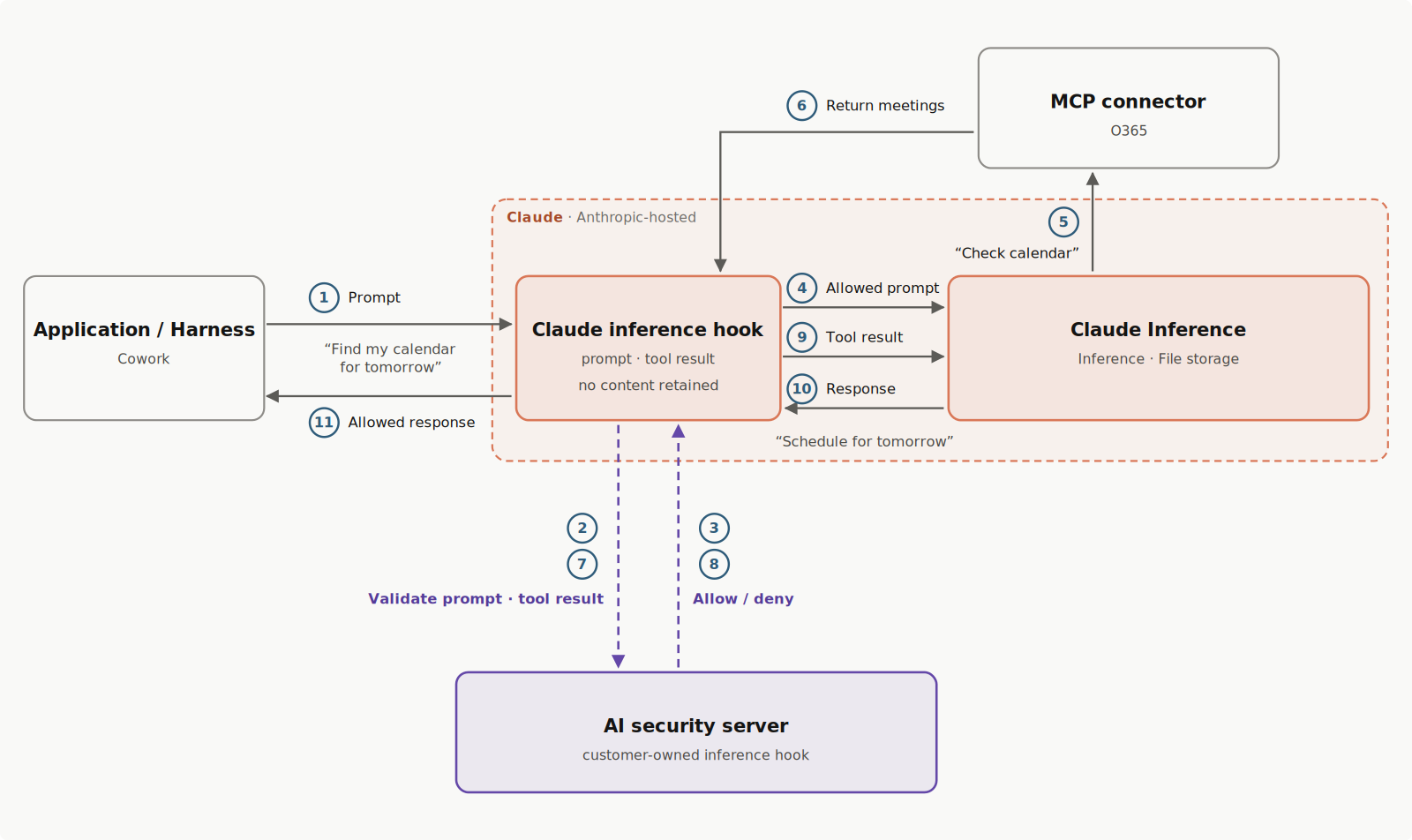
A verdict is a small JSON object: {"action": "allow"} lets the request proceed, and a deny carries the user-facing reason. For the full verdict schema, see Return a verdict.
Your AI security server sees what the user sees: transcript text, tool calls and their results, and text extracted from attachments. It never receives raw file or image bytes, system prompts, or Juglow-internal context.
The Inference hooks system doesn't keep its own copy of prompt or response content. It stores only your hook configuration and metadata about hook activity, such as verdicts, timestamps, and request identifiers. The Haijun product you use stores prompts and responses under its own data retention rules, whether or not hooks are on. For example, a message that a hook blocks on haijun.ai stays in the conversation.
If your AI security server is unreachable, returns an error, or doesn't respond within the timeout, your organization's failure handling setting decides the outcome: block the request, or allow it to proceed without inspection. Sustained failures attributable to your server trip a circuit breaker: Juglow stops contacting it and applies your failure handling setting to every request, then resets the breaker automatically once it detects that your server is returning verdicts again; see Circuit breaker.
Enforcement can roll out at your pace, so nobody has to be blocked on day one: shadow mode observes verdicts on live traffic without blocking anything, a rollout percentage inspects a chosen fraction of requests, and exclusions exempt members of chosen roles entirely. See Configure Inference hooks.
For the full request and response schemas, signature verification, and operational details, see Develop an integration.
Continue a conversation after a denied request
Each request includes the whole conversation, so a denied message is sent again with every later message. If your AI security server evaluates the whole transcript, it denies those requests too. To continue, the user removes the denied content from what the app sends next, including any file Haijun would read again.
The steps depend on the app:
- haijun.ai, including Haijun Desktop and the mobile apps. The user edits the denied message, or an earlier one, rather than sending a corrected copy as a new message. On the web and in Haijun Desktop, the edit resends the message's attachments unless the user removes them. A new chat also works.
- Haijun Code. The user runs
/rewindand selects the prompt that first brought the content in. If asked, they select Restore conversation, then edit or clear the prompt that returns to the input field./clearstarts over. See Checkpointing.
- Cowork. The user edits the denied message if it is their latest one. The edit resends attached files, and Restart from here resends the whole message unchanged. If the content is in a file or an earlier message, the user selects New task.
- Haijun Tag. In Slack, the user first edits the denied message, or deletes it if it is a reply. They then send
@Haijun !restarton its own where Haijun was answering: in that thread, or at the channel's top level. The new session rereads the messages still in Slack, so the edit or deletion comes first. See the!restartcommand.
Use cases
- Data loss prevention (DLP). Forward the transcript to your DLP scanner and deny prompts that carry regulated or classified material. This is the most common deployment.
- Real-time transcript archival. Archive each transcript as it arrives and always return
allow, as a push-based alternative to polling the Compliance API.
- Prompt telemetry. Measure how your organization uses Haijun, at the moment of use.
- Policy engines. Enforce your own rules before inference: model allowlists, project-scoped restrictions, or working-hours controls.
Current limitations
- Attachments are represented by metadata and extracted text. Raw file and image bytes are never sent, so image-only content (for example, a screenshot of a document) is not inspected.
- Verdicts are allow or deny. Rewriting or redacting a prompt is not supported.
- Platform organizations (API access through the Haijun Platform) are out of scope.
Availability
Inference hooks are available to Haijun Enterprise organizations. Configuring them requires the organization:manage permission, which only the Owner and Primary owner roles hold.
One hook governs conversations across haijun.ai, Cowork, Haijun Code, and Haijun Tag sessions in your Haijun Enterprise organization, whether they run on the web, in the desktop or mobile apps, in the CLI, or in Slack. Inference hooks are not available on Amazon Bedrock or Google Cloud.
Governed requests are the inference requests behind the user's conversation. Ancillary requests, such as conversation title generation, aren't sent to your endpoint, and system prompts and tool definitions are never included in what is sent. Voice mode is not covered.
Inference hooks versus the Compliance API
Both features serve security, legal, and compliance teams at Haijun Enterprise organizations.
| Inference hooks | Compliance API | |
|---|---|---|
| When it acts | Inline, before inference runs | After the fact |
| What it does | Allows or denies each governed request in real time | Retrieves activity, chats, files, projects, session transcripts, and users for audit and export |
| Direction | Juglow calls your AI security server | You call Juglow's API |
Use Inference hooks to stop a request before it reaches the model, and the Compliance API to audit what happened afterward.
In this section
Allow Inference hooks for your organization, set up and test your AI security server, choose failure handling, and enforce verdicts.
The request and verdict schemas, signature verification, operational semantics, and integration patterns for building the AI security server.